20. Paddle
Part I's games waited for you. Nothing in Mines or Solitaire happened until you clicked. Paddle, the classic ball game for two paddles, is different: the ball flies whether you press a key or not, and if you look away, you lose the point. This changes how the program works at its core. Instead of reacting to events, the game runs a loop that updates the world and draws it many times a second, on a thread of its own.
What you will learn
- The game loop: fixed time steps, why they matter, and drawing between steps
- Active rendering with
BufferStrategy, in logical coordinates scaled to any window, and full screen - Physics of a ball, and swept collision so fast objects cannot pass through each other
- Keyboard input by polling: held keys, short taps, X11 key repeat, ghosting, configurable keys
- A computer opponent that predicts the ball, and how to make it beatable by tuning with self-play
- Scenes: title, match, pause and end as a stack
- Two threads, one game: the loop thread, the Swing thread, and how they talk safely
- Sound made from numbers: samples, waves and their overtones, envelopes, and a mixer that plays several sounds at once
The complete game is in amade-paddle-game.
The rules
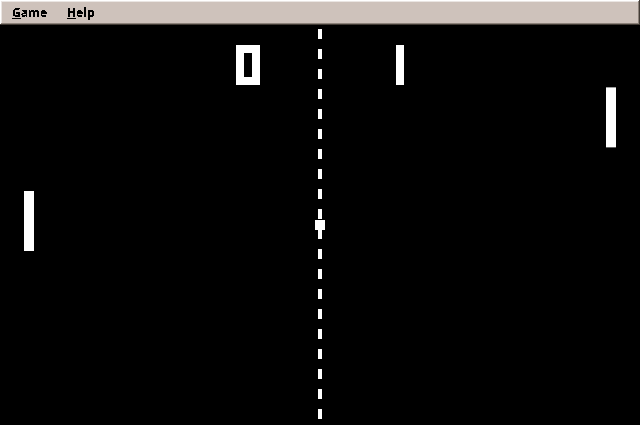
- Two paddles, one on each side, move only up and down. The ball bounces off the top and bottom walls.
- A ball that passes a paddle scores a point for the other side. After a short pause, the ball is served towards the side that lost the point.
- Where the ball meets the paddle decides its new angle: the middle sends it straight back, the edges send it off steeply. Every hit makes the ball a little faster.
- The first to 11 points wins.
- One player plays the right paddle with the arrow keys against the computer, on three difficulties. Right-handed players keep their right hand on the arrow keys, their usual place. Two players share one keyboard: left
WandS, right the arrows. - On the title screen the computer plays itself.
Step 1: The game loop
Every real-time game, from Paddle to the strategy games of part III, has the same heartbeat:
The question is: by how much do we advance the rules each time? The simple answer, "by the time since the last frame", is a trap. Frames are uneven: one takes 15 ms, the next 18 ms, and when the computer is busy, 50 ms. Physics with uneven steps behaves differently on every computer. A ball moving 7.5 units in a 15 ms frame may cross a paddle in a 50 ms one. Replaying a game, testing it and comparing two computers all become impossible.
The answer of this book (and of most game engines) is a fixed time step. The rules always advance by the same small amount, here 1/120 second. Real time is collected, and as many steps are run as fit into it:
public final class FixedStep {
    private final long step;
    private final int maxSteps;
    private long accumulated;

    /**
     * @param stepNanos length of one step in nanoseconds
     * @param maxSteps  most steps per frame; after a long pause (a debugger, a suspended laptop) the game
     *                  does not try to catch up for minutes but simply continues
     */
    public FixedStep(long stepNanos, int maxSteps) {
        if (stepNanos <= 0 || maxSteps < 1) throw new IllegalArgumentException();
        this.step = stepNanos;
        this.maxSteps = maxSteps;
    }

    /** Adds the time since the last frame and returns how many steps to run now. */
    public int advance(long elapsedNanos) {
        accumulated += Math.max(0, elapsedNanos);
        long steps = accumulated / step;
        if (steps > maxSteps) {
            accumulated = 0;
            return maxSteps;
        }
        accumulated -= steps * step;
        return (int) steps;
    }

    /** How far the time is between the last step and the next, 0 to 1, for drawing in between. */
    public double alpha() {
        return (double) accumulated / step;
    }

    /** One step in seconds, the {@code dt} of the rules. */
    public double seconds() {
        return step / 1e9;
    }
}
The left-over time that is not yet a full step stays in accumulated for the next frame. A test shows how uneven frames become even steps:
    @Test
    void unevenFramesBecomeEvenSteps() {
        FixedStep step = new FixedStep(10 * MS, 8);     // steps of 10 ms
        assertEquals(1, step.advance(15 * MS));          // 15 ms: one step, 5 ms left
        assertEquals(0.5, step.alpha(), 1e-9);
        assertEquals(2, step.advance(18 * MS));          // 5 + 18 = 23 ms: two steps, 3 ms left
        assertEquals(0.3, step.alpha(), 1e-9);
        assertEquals(0, step.advance(4 * MS));           // 7 ms: not yet a step
        assertEquals(0.01, step.seconds(), 1e-12);
    }
maxSteps guards against the "spiral of death". After a long pause (a debugger, a suspended laptop) the loop would otherwise try to catch up thousands of steps at once, fall further behind while doing so, and never recover.
Drawing between steps
The rules step 120 times a second, the screen shows about 60 frames. A frame usually falls between two steps. alpha() says where: 0.3 means 30 % of the way from the last step to the next. Each moving object remembers its previous position, and the painter draws it in between:
Without this interpolation, motion stutters slightly, because some frames show the same step twice and others skip one.
The loop itself
    private void run() {
        long last = System.nanoTime();
        while (running) {
            long frameStart = System.nanoTime();
            int steps = step.advance(frameStart - last);
            last = frameStart;
            try {
                for (Runnable command; (command = commands.poll()) != null; ) command.run();
                for (int i = 0; i < steps; i++) update.accept(step.seconds());
                render.accept(step.alpha());
            } catch (RuntimeException e) {
                // One broken frame must not end the game; the log tells what happened.
                LOG.error("Error in the game loop", e);
            }
            // Sleep away the rest of the frame instead of burning a CPU core.
            long rest = frameNanos - (System.nanoTime() - frameStart);
            if (rest > 0) LockSupport.parkNanos(rest);
        }
    }
The loop runs on its own thread named game-loop. Each round runs the waiting commands, the steps and one frame, then sleeps for the rest of the frame with LockSupport.parkNanos. Without that sleep, the loop would draw thousands of frames a second and keep a CPU core at 100 %. An exception in one frame is logged and the game goes on.
Why not a Swing Timer any more?
Solitaire animated with a javax.swing.Timer. That worked because animations were short and nobody notices a frame that comes 5 ms late. A Swing timer runs on the event thread, shares it with every repaint and menu, and fires only approximately on time. A game loop on its own thread decides its own rhythm, and with the fixed step the rules do not care when a frame comes.
Step 2: Drawing actively
Swing paints when it decides: repaint() only asks for a paint, and the event thread does it later. A game needs the opposite: draw now, from the loop thread, every frame. That is active rendering, and it needs a java.awt.Canvas with a BufferStrategy: two images in video memory, one shown while the other is drawn, then swapped.
    /** Draws one frame; called by the game loop on its thread. Does nothing while the canvas is not shown. */
    public void render(double alpha) {
        synchronized (frameLock) {
            if (!isDisplayable() || getWidth() <= 0 || getHeight() <= 0) return;
            BufferStrategy buffers = getBufferStrategy();
            if (buffers == null) {
                createBufferStrategy(2);
                return;
            }
            long start = System.nanoTime();
            // The buffers live in video memory and can be lost (another program, a mode switch): draw again.
            do {
                do {
                    Graphics2D g = (Graphics2D) buffers.getDrawGraphics();
                    try {
                        paintFrame(g, alpha);
                    } finally {
                        g.dispose();
                    }
                } while (buffers.contentsRestored());
                buffers.show();
            } while (buffers.contentsLost());
            // Without this, X11 may collect frames and show them in bursts.
            Toolkit.getDefaultToolkit().sync();
            frameTimes.record(start, System.nanoTime());
        }
    }
The two do … while loops look odd but are the documented way: buffers in video memory can be lost (another program, a screen mode change), and then the frame is simply drawn again.
Logical coordinates
How large is the court? 640 × 400, always, as far as the game knows. Those are logical coordinates. The window may be any size. The canvas scales the logical picture to fit, keeps its proportions, and centres it with black bars:
    private void paintScaled(Graphics2D g, double alpha) {
        int w = getWidth();
        int h = getHeight();
        g.setColor(Color.BLACK);
        g.fillRect(0, 0, w, h);
        double scale = scale(w, h, logicalWidth, logicalHeight);
        double x = (w - logicalWidth * scale) / 2;
        double y = (h - logicalHeight * scale) / 2;
        g.translate(x, y);
        g.scale(scale, scale);
        g.clipRect(0, 0, logicalWidth, logicalHeight);
        g.setRenderingHint(RenderingHints.KEY_ANTIALIASING, RenderingHints.VALUE_ANTIALIAS_ON);
        g.setRenderingHint(RenderingHints.KEY_TEXT_ANTIALIASING, RenderingHints.VALUE_TEXT_ANTIALIAS_ON);
        painter.paint(g, alpha);
        overlay.paint(g, alpha);
    }
g.translate and g.scale set up the transform once; everything drawn afterwards, rectangles and text alike, is scaled by Java2D. The game never computes a real pixel.
A heavyweight in a Swing window
Canvas is an AWT component, a heavyweight with a native window of its own, while Swing components are lightweight and drawn into their parent. Mixing them works, with two pitfalls:
Pitfall: menus behind the canvas
A Swing menu that opens over the canvas is drawn behind it, because lightweight popups are painted into the window below the heavyweight canvas. The cure is one line before the menus are created: JPopupMenu.setDefaultLightWeightPopupEnabled(false). Then menus open in native windows of their own, above the canvas.
Pitfall: menu shortcuts do not work
Swing's key bindings (F2 for a menu entry, Alt+G to open the Game menu) are handled by Swing components. When the canvas has the focus, keys go to the canvas, and Swing never sees them. GameCanvas passes on the keys the game did not use:
    /** Keys go to the game's listeners first; what they leave unconsumed reaches the window's menu shortcuts. */
    @Override
    protected void processKeyEvent(KeyEvent e) {
        super.processKeyEvent(e);
        if (!e.isConsumed()) SwingUtilities.processKeyBindings(e);
    }
That is why Paddle's pause key has no menu shortcut: P is the game's key, and the menu would see it too.
Full screen
With logical coordinates, full screen costs the game nothing: the screen is just a very large window, and the canvas scales the court to it. F11 switches, in the Game menu as Full Screen. The work is in the engine's FullScreen, and it is mostly about the window, not the drawing.
    public void enter() {
        if (active) return;
        GraphicsDevice device = frame.getGraphicsConfiguration().getDevice();
        windowBounds = frame.getBounds();
        windowState = frame.getExtendedState();
        canvas.withoutFrames(() -> {
            reopen(true);
            if (device.isFullScreenSupported()) {
                device.setFullScreenWindow(frame);
            } else {
                frame.setBounds(device.getDefaultConfiguration().getBounds());
                frame.setVisible(true);
            }
        });
        active = true;
        mirrorShortcuts();
        canvas.requestFocusInWindow();
    }
Three things in these lines need a word.
No frame, no menu bar. A full-screen game should show the court and nothing else. A JFrame can only lose its title bar and border (setUndecorated(true)) while it has no native window, so the switch calls dispose() first and shows the window again afterwards. The menu bar is hidden too.
The screen keeps its resolution. GraphicsDevice can also change the screen's resolution (setDisplayMode), which was the classic trick to make old PCs fast: fewer pixels, less to draw. Today it makes monitors flicker and go black for a second, rearranges the windows on the desktop, and on Linux often is not supported at all. The canvas scales anyway, so FullScreen never changes the mode. setFullScreenWindow is still worth calling instead of only covering the screen with a large window: it tells the window manager that this is a full-screen window, so the desktop's compositor can hand the screen straight to the game, and on Windows the buffers are then flipped instead of copied. Where full screen is not supported, the window simply covers the monitor.
The canvas gets a new native window. dispose() takes away the canvas's native window and its buffers while the game loop may be drawing on them on its own thread. withoutFrames in GameCanvas makes the switch and the drawing of a frame wait for each other: both hold the same lock. After the switch, the next frame finds no buffers and creates new ones, exactly as at the start.
Pitfall: the game ends on F11
dispose() sends windowClosed, and Paddle used to end the program on windowClosed. The first test of F11 closed the game. FullScreen counts its own dispose() calls and passes on only the real closing: window.whenClosed(...) replaces the window listener in AmadePaddleApplication.
Pitfall: a hidden menu bar has no shortcuts
Swing ignores the shortcuts of a menu bar that is not showing. F2 and F3 would stop working in full screen, and so would F11, the only way back. While the menu bar is hidden, FullScreen puts every shortcut of the menu into the window's own key bindings, where it clicks the menu entry:
    /**
     * A hidden menu bar ignores its shortcuts. While it is hidden, the window's root pane answers them and
     * clicks the menu item.
     */
    private void mirrorShortcuts() {
        JMenuBar bar = frame.getJMenuBar();
        if (bar == null) return;
        InputMap keys = frame.getRootPane().getInputMap(JComponent.WHEN_IN_FOCUSED_WINDOW);
        for (JMenuItem item : itemsWithShortcuts(bar)) {
            KeyStroke key = item.getAccelerator();
            String name = MIRROR + key;
            keys.put(key, name);
            frame.getRootPane().getActionMap().put(name, new AbstractAction() {
                @Override
                public void actionPerformed(ActionEvent e) {
                    if (item.isEnabled()) item.doClick(0);
                }
            });
            mirrored.add(key);
        }
    }
Switching also takes the focus away for a moment, so a running match pauses, as it does whenever the window loses the focus.
Step 3: The rules of the ball
The court is in Court: sizes and speeds in logical units per second. The match advances one step at a time:
    /**
     * Advances the match by one step.
     *
     * @param leftMove  -1 (up) to +1 (down) for the left paddle
     * @param rightMove the same for the right paddle
     */
    public void update(double seconds, double leftMove, double rightMove) {
        events.clear();
        left.move(leftMove, seconds);
        right.move(rightMove, seconds);
        if (winner != null) return;
        if (serveDelay > 0) {
            serveDelay -= seconds;
            if (serveDelay <= 0) serve();
            return;
        }
        ball.previousX = ball.x;
        ball.previousY = ball.y;
        ball.x += ball.vx * seconds;
        ball.y += ball.vy * seconds;
        bounceOffWalls();
        if (ball.vx < 0) hitPaddle(left);
        else hitPaddle(right);
        if (ball.x + Court.BALL_SIZE < 0) point(Side.RIGHT);
        else if (ball.x > Court.WIDTH) point(Side.LEFT);
    }
Movement is the simplest physics there is: position plus velocity times time (ball.x += ball.vx * seconds). The walls mirror the ball: a ball that would end 2 units above the top edge ends 2 units below it, flying down.
Swept collision
The paddle is 10 units wide. At its top speed of 900 units per second, the ball moves 7.5 units per step, almost a paddle's width. A test that only asks "does the ball overlap the paddle now?" will one day miss: the ball is in front of the paddle in one step and behind it in the next. This is tunnelling, a classic bug of games that test collisions only at the end of a step.
Paddle tests the whole way instead. Did the ball's front edge cross the paddle's face during this step? If so, where was the ball vertically at that moment?
    /**
     * Did the ball cross the paddle's face during this step? Checking the whole way from the previous
     * position, not only where the ball is now, means a fast ball cannot jump through the paddle.
     */
    private void hitPaddle(Paddle paddle) {
        double face = paddle.face();
        boolean towardsLeft = paddle.side() == Side.LEFT;
        // The edge of the ball that meets the face: its left edge on the left side, its right edge on the right.
        double before = towardsLeft ? ball.previousX : ball.previousX + Court.BALL_SIZE;
        double now = towardsLeft ? ball.x : ball.x + Court.BALL_SIZE;
        boolean crossed = towardsLeft ? before >= face && now < face : before <= face && now > face;
        if (!crossed) return;
        // Where was the ball, vertically, at the moment it reached the face?
        double t = (before - face) / (before - now);
        double yAtFace = ball.previousY + (ball.y - ball.previousY) * t;
        if (yAtFace + Court.BALL_SIZE < paddle.y() || yAtFace > paddle.y() + Court.PADDLE_HEIGHT) return;

        // Where it hit decides the angle: the middle sends it straight back, the edges at up to 55°.
        double offset = (yAtFace + Court.BALL_SIZE / 2 - paddle.centreY())
                / (Court.PADDLE_HEIGHT / 2 + Court.BALL_SIZE / 2);
        double angle = Math.clamp(offset, -1.0, 1.0) * Court.MAX_ANGLE;
        double speed = Math.min(Court.MAX_BALL_SPEED, ball.speed() * Court.SPEED_UP);
        double direction = towardsLeft ? 1 : -1;
        ball.vx = direction * speed * Math.cos(angle);
        ball.vy = speed * Math.sin(angle);
        // Mirror the part of the step that went past the face.
        double past = now - face;
        ball.x -= 2 * past;
        hits++;
        events.add(Event.PADDLE);
    }
t is the share of the step at which the ball reached the face; yAtFace the height it had then. The rest of the step, the part "behind" the face, is mirrored back. The test proves it with a ball faster than the paddle is wide:
    @Test
    void theMiddleOfThePaddleSendsTheBallStraightBackAndFaster() {
        Match match = match();
        Paddle right = match.paddle(Side.RIGHT);
        match.placePaddle(Side.RIGHT, 170);                     // centre at 200
        match.placeBall(right.face() - Court.BALL_SIZE - 1, 195, 600, 0);
        match.update(STEP, 0, 0);
        assertTrue(match.ball().vx() < 0, "bounced back");
        assertEquals(0, match.ball().vy(), 1e-9, "straight back");
        assertEquals(600 * Court.SPEED_UP, match.ball().speed(), 1e-9);
        assertEquals(1, match.hits());
    }

    @Test
    void theEdgeOfThePaddleSendsItSteeply() {
        Match match = match();
        Paddle left = match.paddle(Side.LEFT);
        match.placePaddle(Side.LEFT, 170);
        match.placeBall(left.face() + 1, 225, -600, 0);         // ball centre at the paddle's lower edge
        match.update(STEP, 0, 0);
        double angle = Math.toDegrees(Math.atan2(match.ball().vy(), match.ball().vx()));
        assertTrue(angle > 40 && angle <= 55, "downwards at a steep angle, was " + angle);
    }

    @Test
    void aFastBallCannotJumpThroughThePaddle() {
        Match match = match();
        Paddle right = match.paddle(Side.RIGHT);
        match.placePaddle(Side.RIGHT, 170);
        // Fast enough to cross the whole paddle within one step: 3000 units/s is 25 units per step.
        match.placeBall(right.face() - Court.BALL_SIZE - 5, 195, 3000, 0);
        match.update(STEP, 0, 0);
        assertTrue(match.ball().vx() < 0, "the swept check found the crossing");
        assertTrue(match.ball().x() + Court.BALL_SIZE <= right.face());
    }
The angle
The offset of the hit runs from −1 (top edge) through 0 (middle) to +1 (bottom edge), and the new angle is up to 55° in that direction. This one rule turns a reflex game into a game of skill: you aim by choosing where the ball meets your paddle. It goes back to the arcade original of 1972.
Step 4: The keyboard
Mines and Solitaire reacted to events: a click arrives, the game reacts. A real-time game asks instead, every step: is the up arrow held right now? That is polling. Java delivers key events, so something must turn events into state. KeyState does that, and it solves two problems of real keyboards on the way:
public final class KeyState {
    /** How long a release waits for the press that would make it a key repeat. */
    public static final long REPEAT_WINDOW = 25_000_000;

    private final Set<Integer> down = new HashSet<>();
    private final Map<Integer, Long> releasing = new HashMap<>();
    private final Set<Integer> pressedSincePoll = new HashSet<>();
    private Set<Integer> pressed = Set.of();

    public void pressed(int key, long now) {
        if (releasing.remove(key) != null) return;    // release and press of a key repeat: still held
        if (down.add(key)) pressedSincePoll.add(key);  // a new press (repeated presses are ignored)
    }

    public void released(int key, long now) {
        if (down.contains(key)) releasing.put(key, now);
    }

    /** Takes the presses since the last poll and lets releases older than the window take effect. */
    public void poll(long now) {
        for (Iterator<Map.Entry<Integer, Long>> it = releasing.entrySet().iterator(); it.hasNext(); ) {
            Map.Entry<Integer, Long> release = it.next();
            if (now - release.getValue() >= REPEAT_WINDOW) {
                down.remove(release.getKey());
                it.remove();
            }
        }
        pressed = Set.copyOf(pressedSincePoll);
        pressedSincePoll.clear();
    }

    /** Forgets all held keys at once, e.g. when the window loses the focus and their releases never come. */
    public void releaseAll() {
        down.clear();
        releasing.clear();
    }

    /** True while the key is held, as of the last poll and the events since. */
    public boolean isDown(int key) {
        return down.contains(key);
    }

    /** True if the key went down between the last two polls, however short the press was. */
    public boolean wasPressed(int key) {
        return pressed.contains(key);
    }
}
Short taps. If P goes down and up between two steps, "is P held?" is false at both. wasPressed remembers every press until the next poll, so a tap is never lost.
Key repeat on X11. Hold a key on Linux, and the X server sends release, press, release, press … every 30 milliseconds, the auto-repeat meant for typing text. A game that believes every release would see the paddle stutter. KeyState therefore waits 25 ms before it believes a release: if a press of the same key follows, it was a repeat.
    @Test
    void x11KeyRepeatDoesNotLookLikeReleases() {
        KeyState keys = new KeyState();
        keys.pressed(UP, 0);
        keys.poll(1 * MS);
        assertTrue(keys.wasPressed(UP));
        // Holding the key: X11 sends release and press again, 1 ms apart, every 30 ms.
        for (long t = 500 * MS; t < 1000 * MS; t += 30 * MS) {
            keys.released(UP, t);
            keys.pressed(UP, t + MS);
            keys.poll(t + 10 * MS);
            assertTrue(keys.isDown(UP));
            assertFalse(keys.wasPressed(UP), "a repeat is not a new press");
        }
        keys.released(UP, 2000 * MS);                     // really let go
        keys.poll(2010 * MS);
        assertTrue(keys.isDown(UP), "not yet: a press may still follow");
        keys.poll(2030 * MS);
        assertFalse(keys.isDown(UP));
    }
KeyState knows neither AWT nor the real clock: events come in as numbers with times. The AWT side is Keyboard, which listens to the canvas on the Swing thread and is safe to ask from the loop thread (its methods are synchronized). Its clock can be replaced, which the tests do. They run the keyboard on a counter that advances exactly one step per game step.
Keys and actions
The rules should never ask "is the up arrow down?". They ask "does the right player move up?", and a small table says which keys mean that:
public final class Controls<A extends Enum<A>> {
    private final Map<A, List<Integer>> keys;
    private final Keyboard keyboard;

    public Controls(Class<A> actions, Keyboard keyboard) {
        this.keys = new EnumMap<>(actions);
        this.keyboard = keyboard;
    }

    /** Adds keys that trigger an action. */
    public Controls<A> bind(A action, int... keyCodes) {
        List<Integer> list = keys.computeIfAbsent(action, a -> new ArrayList<>());
        for (int key : keyCodes) list.add(key);
        return this;
    }

    /** Replaces the keys of an action. */
    public Controls<A> rebind(A action, int... keyCodes) {
        keys.remove(action);
        return bind(action, keyCodes);
    }

    public boolean isDown(A action) {
        for (int key : keys.getOrDefault(action, List.of())) if (keyboard.isDown(key)) return true;
        return false;
    }

    public boolean wasPressed(A action) {
        for (int key : keys.getOrDefault(action, List.of())) if (keyboard.wasPressed(key)) return true;
        return false;
    }

    /** -1 while only the first action is held, +1 while only the second, else 0: e.g. up and down. */
    public int axis(A negative, A positive) {
        return (isDown(positive) ? 1 : 0) - (isDown(negative) ? 1 : 0);
    }
}
        controls = new Controls<>(Action.class, keyboard)
                .bind(Action.LEFT_UP, settings.keys("left-up", KeyEvent.VK_W))
                .bind(Action.LEFT_DOWN, settings.keys("left-down", KeyEvent.VK_S))
                .bind(Action.RIGHT_UP, settings.keys("right-up", KeyEvent.VK_UP))
                .bind(Action.RIGHT_DOWN, settings.keys("right-down", KeyEvent.VK_DOWN))
                .bind(Action.PAUSE, settings.keys("pause", KeyEvent.VK_P, KeyEvent.VK_ESCAPE))
                .bind(Action.ONE_PLAYER, KeyEvent.VK_1, KeyEvent.VK_NUMPAD1, KeyEvent.VK_ENTER)
                .bind(Action.TWO_PLAYERS, KeyEvent.VK_2, KeyEvent.VK_NUMPAD2)
                .bind(Action.CONFIRM, KeyEvent.VK_ENTER, KeyEvent.VK_SPACE);
The keys of the paddles come from the settings, so players can change them in paddle.properties (keys.right-up=UP NUMPAD8).
Pitfall: ghosting
Many keyboards cannot report every combination of keys held at once. The keys are wired in a grid, and with three or four keys down, some combinations look like others and are dropped. This is called ghosting or limited rollover. If two players report "my paddle sometimes does not move", that is the cause. W/S together with the arrow keys is safe on practically every keyboard, which is why they are the defaults, and the keys can be changed.
Step 5: The computer opponent
A perfect opponent is easy: move the paddle to wherever the ball is going. Nobody would ever score a point, so nobody would play. The art of game AI is the opposite: an opponent that plays believably and loses sometimes.
The computer player does what a person does:
    /** How to move this step: -1 (up) to +1 (down), at most the difficulty's share of full speed. */
    public double move(Match match, double seconds) {
        nextLook -= seconds;
        if (nextLook <= 0) {
            nextLook = difficulty.reaction();
            target = chooseTarget(match);
        }
        double distance = target - match.paddle(side).centreY();
        if (Math.abs(distance) < DEAD_ZONE) return 0;
        double urgency = Math.min(1, Math.abs(distance) / SLOW_ZONE);
        return Math.signum(distance) * urgency * difficulty.speed();
    }

    private double chooseTarget(Match match) {
        Ball ball = match.ball();
        boolean coming = side == Side.LEFT ? ball.vx() < 0 : ball.vx() > 0;
        if (coming && !wasComing) miss = (random.nextDouble() * 2 - 1) * difficulty.error() * Court.PADDLE_HEIGHT / 2;
        wasComing = coming;
        if (!coming) return Court.HEIGHT / 2;               // wait in the middle
        return predictY(ball, match.paddle(side).face()) + miss;
    }
- It looks at the ball now and then, not every step: the reaction time.
- While the ball flies away, it waits in the middle.
- When the ball comes, it predicts where the ball will arrive and aims a bit off, chosen once per ball.
- It moves at a limited speed, and slows down near its target instead of overshooting.
Predicting with mirrors
Where will the ball be when it reaches the paddle, after any number of bounces off the walls? The trick is to forget the walls. Let the ball fly on in a straight line, as if the court continued forever, and then fold the result back, as light behaves between two mirrors:
    /**
     * Where the ball's centre will be when it reaches {@code faceX}, bounces off the walls included.
     *
     * <p>The trick: pretend there are no walls and let the ball fly on in a straight line. Then fold the
     * result back into the court, as if the court were mirrored at every wall, the way light behaves
     * between two mirrors.
     */
    static double predictY(Ball ball, double faceX) {
        double ballEdge = ball.vx() < 0 ? ball.x() : ball.x() + Court.BALL_SIZE;
        double time = Math.max(0, (faceX - ballEdge) / ball.vx());
        double free = ball.y() + ball.vy() * time;                 // as if there were no walls
        double room = Court.HEIGHT - Court.BALL_SIZE;              // where the ball's top edge can be
        double period = 2 * room;                                  // down and up again
        double folded = ((free % period) + period) % period;       // 0 to period, also for negative values
        if (folded > room) folded = period - folded;               // the mirrored half comes back
        return folded + Court.BALL_SIZE / 2;
    }
    @Test
    void predictsTheBounceOffAWall() {
        Ball ball = new Ball();
        // Top edge at 50, rising 1 unit per unit to the right; the face is 200 units away.
        ball.place(390, 50, 300, -300);
        // Without walls the top edge would end at 50 - 200 = -150; mirrored at the top wall: +150.
        assertEquals(150 + Court.BALL_SIZE / 2, ComputerPlayer.predictY(ball, 600), 1e-9);
    }
Three numbers make a difficulty
public enum Difficulty {
    //      speed  reaction  error
    EASY(0.6, 0.25, 1.7),
    NORMAL(0.8, 0.15, 1.4),
    HARD(0.95, 0.08, 1.25);

    private final double speed;
    private final double reaction;
    private final double error;

    /**
     * @param speed    share of the paddle's top speed the computer uses
     * @param reaction seconds between two looks at the ball
     * @param error    how far off it aims, at most, as a share of half a paddle. Above about 1.17 the error
     *                 can exceed the paddle's reach (half a paddle plus half a ball), and only then does the
     *                 computer miss a ball it could reach. The values were tuned by letting the computer
     *                 play itself: against Easy a point takes about 7 seconds, against Hard about 20.
     */
    Difficulty(double speed, double reaction, double error) {
        this.speed = speed;
        this.reaction = reaction;
        this.error = error;
    }
Tuning by self-play
How do you find good values? Guessing and playing a few rounds is slow and unreliable. The better way: let the computer play itself thousands of points in seconds, and measure. A small program played every difficulty against every other and printed the seconds and hits per point.
The first measurement was a surprise: even Easy returned about 20 balls per point, and Hard against Hard never ended. Two flaws showed up:
- The error was averaged away. The first version chose a new aiming error at every look, several times per ball. Random errors around the right spot average out, so the paddle ended up right. A person decides once where to go. Choosing the error once per ball fixed this (the
coming && !wasComingline). - The error never exceeded the paddle. A paddle reaches half its height plus half the ball, 35 units, from its centre. An error of at most half a paddle, 30 units, can never miss. Only errors larger than about 1.17 half-paddles make the computer miss a ball it could reach.
After both fixes, the measurement gave: about 7 seconds per point against Easy, 11 against Normal, about 20 between two Hard players. That makes matches of a few minutes, as the arcade original had. Tests keep the result from breaking unnoticed:
    @Test
    void harderOpponentsWinMoreOften() {
        int hardWins = 0;
        for (long seed = 0; seed < 20; seed++) {
            Match match = play(Difficulty.EASY, Difficulty.HARD, seed);
            assertNotNull(match.winner(), "every match ends");
            if (match.winner() == Side.RIGHT) hardWins++;
        }
        assertTrue(hardWins >= 16, "hard beat easy only " + hardWins + " of 20 times");
    }
And ten minutes of the title screen's demo, simulated in under a second, prove that the ball never leaves the court and points keep coming:
    @Test
    void tenMinutesOfDemoNeverGetStuck() {
        Match match = new Match(new SplittableRandom(7));
        ComputerPlayer l = new ComputerPlayer(Side.LEFT, Difficulty.NORMAL, new SplittableRandom(8));
        ComputerPlayer r = new ComputerPlayer(Side.RIGHT, Difficulty.NORMAL, new SplittableRandom(9));
        int points = 0;
        int lastScore = 0;
        int rally = 0;
        int longestRally = 0;
        int lastHits = 0;
        for (int step = 0; step < 120 * 60 * 10; step++) {
            match.update(STEP, l.move(match, STEP), r.move(match, STEP));
            Ball ball = match.ball();
            assertTrue(ball.y() >= 0 && ball.y() <= Court.HEIGHT - Court.BALL_SIZE, "the ball left the court");
            if (match.hits() > lastHits) {
                lastHits = match.hits();
                longestRally = Math.max(longestRally, ++rally);
            }
            int score = match.score(Side.LEFT) + match.score(Side.RIGHT);
            if (score > lastScore) {
                points++;
                rally = 0;
            }
            lastScore = score;
            if (match.winner() != null) {                       // the demo starts a new match
                match = new Match(new SplittableRandom(step));
                lastScore = 0;
                lastHits = 0;
            }
        }
        assertTrue(points >= 20, "points keep coming: " + points + " in ten minutes");
        assertTrue(longestRally < 200, "no endless rally: " + longestRally);
    }
Simulate, measure, then decide
Because the rules are plain Java without a clock, a minute of play is a loop of 7200 calls. Use it: tune difficulties, find endless rallies, check that a level can be won. You will do this again for the ghosts in Maze and the opponents in Sands.
Step 6: Scenes
A game is more than its match: a title screen, the match, a pause screen, the end. Each is a scene: it updates and it draws.
public interface Scene {
    /** Advances by one fixed step of {@code seconds}. */
    void update(double seconds);

    /**
     * Draws the scene.
     *
     * @param alpha how far the time is between the last step and the next, 0 to 1, for smooth movement
     */
    void render(Graphics2D g, double alpha);

    /**
     * Draws what lies on top of the world, such as the score or a text, in the same coordinates. The
     * {@link eu.amadeos.gameengine.swing.GameCanvas} draws it last, straight onto the screen, so text stays
     * sharp whatever the render mode. Nothing by default.
     */
    default void renderOverlay(Graphics2D g, double alpha) {
    }
}
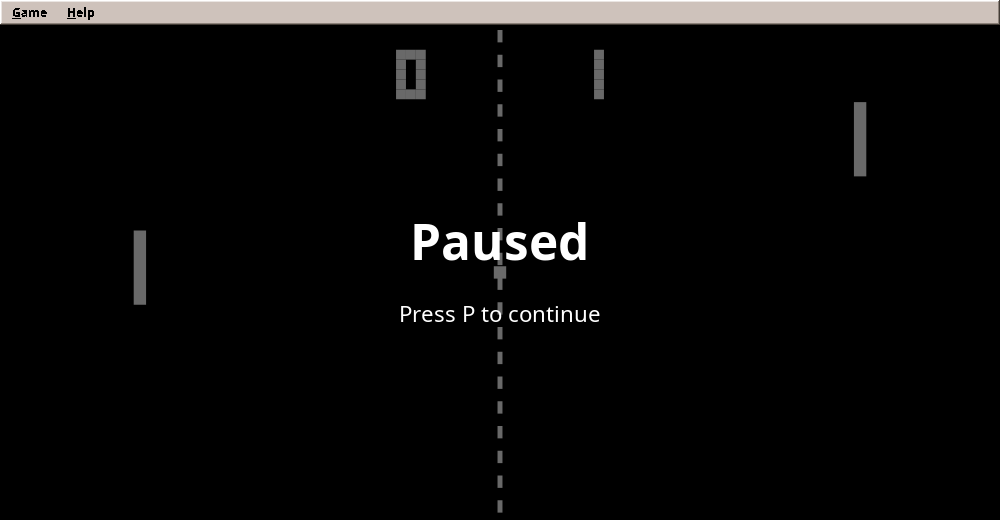
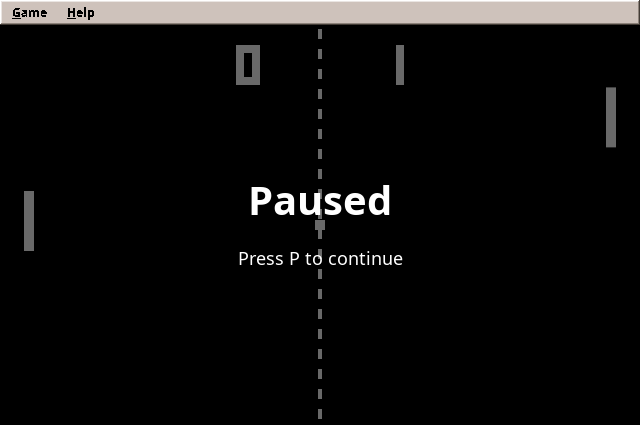
Scenes live on a stack. Only the top one is updated, but all are drawn from the bottom up. So pushing the pause scene onto the match freezes the match, and it stays visible under the pause text. Popping the pause scene lets the match continue exactly where it stopped:
public final class SceneStack implements Scene {
    private final List<Scene> scenes = new ArrayList<>();

    /** Puts a scene on top; the one below stops moving. */
    public void push(Scene scene) {
        scenes.add(Objects.requireNonNull(scene, "scene"));
    }

    /** Removes the top scene; the one below moves again. */
    public void pop() {
        if (!scenes.isEmpty()) scenes.removeLast();
    }

    /** Replaces all scenes by one, e.g. from the title to the match. */
    public void replace(Scene scene) {
        scenes.clear();
        push(scene);
    }

    public Scene top() {
        return scenes.isEmpty() ? null : scenes.getLast();
    }

    public int size() {
        return scenes.size();
    }

    @Override
    public void update(double seconds) {
        if (!scenes.isEmpty()) scenes.getLast().update(seconds);
    }

    @Override
    public void render(Graphics2D g, double alpha) {
        // A copy: a scene may push or pop while the frame is drawn.
        for (Scene scene : List.copyOf(scenes)) scene.render(g, alpha);
    }

    /** The overlays of all scenes, bottom first, after all worlds: a pause text lies over the match's score. */
    @Override
    public void renderOverlay(Graphics2D g, double alpha) {
        for (Scene scene : List.copyOf(scenes)) scene.renderOverlay(g, alpha);
    }
}
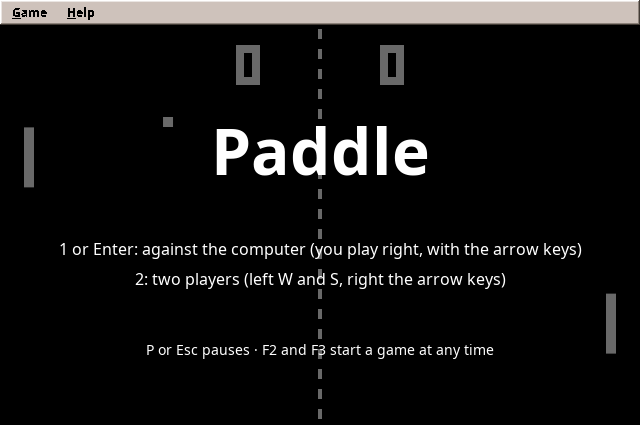
The title scene runs a match of its own, computer against computer, and waits for 1 or 2:
    /** The computer plays itself; 1 or Enter starts a game against it, 2 a game for two. */
    final class TitleScene implements Scene {
        private Match demo = new Match(random);
        private final ComputerPlayer left = new ComputerPlayer(Side.LEFT, Difficulty.NORMAL, random);
        private final ComputerPlayer right = new ComputerPlayer(Side.RIGHT, Difficulty.NORMAL, random);

        @Override
        public void update(double seconds) {
            if (controls.wasPressed(Action.ONE_PLAYER)) {
                scenes.replace(new MatchScene(Mode.ONE_PLAYER, difficulty));
                return;
            }
            if (controls.wasPressed(Action.TWO_PLAYERS)) {
                scenes.replace(new MatchScene(Mode.TWO_PLAYERS, difficulty));
                return;
            }
            demo.update(seconds, left.move(demo, seconds), right.move(demo, seconds));
            if (demo.winner() != null) demo = new Match(random);
        }

        @Override
        public void render(Graphics2D g, double alpha) {
            CourtPainter.paint(g, demo, alpha);
            CourtPainter.veil(g);
            CourtPainter.text(g, msg.get("window.title"), 150, 64, true);
            CourtPainter.text(g, msg.get("title.one-player"), 230, 16, false);
            CourtPainter.text(g, msg.get("title.two-players"), 260, 16, false);
            CourtPainter.text(g, msg.get("title.pause"), 330, 14, false);
        }
    }
The match scene reads the controls, asks the computer for the left paddle in one-player mode, steps the match, and when there is a winner, replaces itself with the end scene:
    /** A match: the player on the right, the left paddle played by the computer or a second player. */
    final class MatchScene implements Scene {
        private final Mode mode;
        private final Difficulty matchDifficulty;
        private final Match match = new Match(random);
        private final ComputerPlayer computer;

        MatchScene(Mode mode, Difficulty matchDifficulty) {
            this.mode = mode;
            this.matchDifficulty = matchDifficulty;
            this.computer = new ComputerPlayer(Side.LEFT, matchDifficulty, random);
        }

        @Override
        public void update(double seconds) {
            if (controls.wasPressed(Action.PAUSE)) {
                scenes.push(new PauseScene());
                return;
            }
            double leftMove = mode == Mode.TWO_PLAYERS
                    ? controls.axis(Action.LEFT_UP, Action.LEFT_DOWN)
                    : computer.move(match, seconds);
            double rightMove = controls.axis(Action.RIGHT_UP, Action.RIGHT_DOWN);
            match.update(seconds, leftMove, rightMove);
            play(match.events());
            if (match.winner() != null) {
                MatchResult result = new MatchResult(mode, matchDifficulty, match.winner(),
                        match.score(Side.LEFT), match.score(Side.RIGHT));
                scenes.replace(new OverScene(match, result));
                // The presenter lives on the Swing thread: hand the result over there.
                Consumer<MatchResult> listener = onMatchOver;
                ui.execute(() -> listener.accept(result));
            }
        }

        @Override
        public void render(Graphics2D g, double alpha) {
            CourtPainter.paint(g, match, alpha);
        }

        Match match() {
            return match;
        }
    }
The painter draws the court, the net, the score in big block digits like the arcade original, and the paddles and ball between their last two positions:
    static void paint(Graphics2D g, Match match, double alpha) {
        g.setColor(GROUND);
        g.fill(new Rectangle2D.Double(0, 0, Court.WIDTH, Court.HEIGHT));
        g.setColor(CHALK);
        for (double y = 4; y < Court.HEIGHT; y += 20) {
            g.fill(new Rectangle2D.Double(Court.WIDTH / 2 - 2, y, 4, 10));
        }
        paintNumber(g, match.score(Side.LEFT), Court.WIDTH / 2 - 60, true);
        paintNumber(g, match.score(Side.RIGHT), Court.WIDTH / 2 + 60, false);
        for (Side side : Side.values()) {
            Paddle p = match.paddle(side);
            double y = p.previousY() + (p.y() - p.previousY()) * alpha;
            g.fill(new Rectangle2D.Double(p.x(), y, Court.PADDLE_WIDTH, Court.PADDLE_HEIGHT));
        }
        Ball ball = match.ball();
        if (match.winner() == null) {
            double x = ball.previousX() + (ball.x() - ball.previousX()) * alpha;
            double y = ball.previousY() + (ball.y() - ball.previousY()) * alpha;
            g.fill(new Rectangle2D.Double(x, y, Court.BALL_SIZE, Court.BALL_SIZE));
        }
    }
Step 7: Two threads, one game
Paddle now has two threads, and this needs care:
| Thread | Runs | Touches |
|---|---|---|
| Swing event thread | menus, dialogs, the presenter, key events | the window, the settings, the high scores |
| game-loop | updates, scenes, drawing | the match, the scenes |
The rule that keeps this simple: each object belongs to one thread. The match and the scenes are touched only by the loop thread, so they need no locks at all. Where the two must talk, there are exactly two doors:
Swing → loop: commands. The presenter must start a match when the player chooses Game → One Player. It does not touch the scenes. It posts a command, and the loop runs it before its next step:
    @Override
    public void showTitle() {
        run(() -> scenes.replace(new TitleScene()));
    }

    @Override
    public void startMatch(Mode mode, Difficulty newDifficulty) {
        run(() -> scenes.replace(new MatchScene(mode, newDifficulty)));
    }

    @Override
    public void setDifficulty(Difficulty newDifficulty) {
        difficulty = newDifficulty;
    }

    @Override
    public void pause() {
        run(() -> {
            if (scenes.top() instanceof MatchScene) scenes.push(new PauseScene());
        });
    }

    @Override
    public void setSound(boolean on) {
        mixer.setMuted(!on);
    }

    @Override
    public void onMatchOver(Consumer<MatchResult> listener) {
        onMatchOver = listener;
    }

    /** On the loop thread when it runs; directly before the loop starts and in tests. */
    private void run(Runnable command) {
        if (loop != null && loop.running()) loop.post(command);
        else command.run();
    }
Loop → Swing: results. When a match ends, the presenter must ask for the player's name, a Swing dialog. The match scene does not call the presenter directly. It hands the result to an Executor that runs it on the event thread (ui.execute(...) in the match scene above).
The presenter only sees an interface, Arena, the game's door for commands:
/**
 * What the presenter may ask of the running game. The game runs on its own thread; every method here is
 * safe to call from the Swing thread and takes effect at the start of the game's next step.
 */
public interface Arena {
    /** Back to the title screen, where the computer plays itself. */
    void showTitle();

    void startMatch(Mode mode, Difficulty difficulty);

    /** The difficulty a match started from the title screen gets. */
    void setDifficulty(Difficulty difficulty);

    /** Sound effects on or off. */
    void setSound(boolean on);

    /** Pauses a running match; does nothing elsewhere. */
    void pause();

    /** Called on the Swing thread when a match ends. */
    void onMatchOver(Consumer<MatchResult> listener);
}
So Paddle combines both patterns of chapter 2: the court is model, renderer and loop, and everything around it is Model-View-Presenter. The presenter decides what a won match is worth:
    /**
     * A match ended. A win against the computer may enter the table of its difficulty; the fewer points the
     * computer made, the better.
     */
    void matchOver(MatchResult result) {
        if (result.mode() != Mode.ONE_PLAYER || result.winner() != Side.RIGHT) return;
        int conceded = result.score(Side.LEFT);
        String table = result.difficulty().id();
        if (!scores.qualifies(table, conceded)) return;
        String level = Mnemonics.strip(msg.get(difficultyKey(result.difficulty())));
        view.askName(msg.format("scores.won", level, result.score(Side.RIGHT), conceded)).ifPresent(name -> {
            int place = scores.add(table, new Score(name, conceded, now.get()));
            view.showScores(result.difficulty(), place);
        });
    }
Is MVP still worth it here?
The presenter of Paddle is thin: several of its methods only pass a command on to the Arena. For a game this small, the menu logic could live in the window. It stays in a presenter for two reasons. The rules around the court (only a win against the computer counts, a two-player game does not) are tested in milliseconds without a screen. And the presenter keeps a clean border between the threads: it never touches the match, only the Arena. Swing code that reaches into the match directly is how thread bugs begin. The frame around the play area grows in later games (levels, settings, saved games), and with it the value of the presenter.
Testing a real-time game
The threads make testing look hard. They are not, if the test plays the loop itself. PaddleGameTest creates the game without starting the loop, presses keys on a keyboard whose clock it controls, and calls the steps one by one, all on the test thread:
    @Test
    void oneStartsAGameAndTheArrowKeysMoveTheRightPaddle() {
        assertInstanceOf(PaddleGame.TitleScene.class, game.top());
        tap(KeyEvent.VK_1);
        double before = match().paddle(Side.RIGHT).y();
        keyboard.pressed(KeyEvent.VK_UP, now[0]);
        steps(30);                                              // a quarter of a second
        assertEquals(before - Court.PADDLE_SPEED * 0.25, match().paddle(Side.RIGHT).y(), 1e-6);
    }
    @Test
    void pauseFreezesTheMatchAndShowsItUnderneath() {
        game.startMatch(Mode.ONE_PLAYER, Difficulty.NORMAL);
        steps(200);                                             // the serve is done, the ball flies
        tap(KeyEvent.VK_P);
        assertInstanceOf(PaddleGame.PauseScene.class, game.top());
        assertEquals(2, game.sceneCount(), "the match lies underneath");
        tap(KeyEvent.VK_P);
        Match match = match();
        double x = match.ball().x();
        steps(1);
        assertTrue(match.ball().x() != x, "moving again");
    }
The presenter is tested with a fake Arena that only records commands, and a fake view, exactly as in part I:
    @Test
    void aWinAgainstTheComputerEntersTheTable() {
        view.names.push(Optional.of("Anna"));
        arena.listener.accept(new MatchResult(Mode.ONE_PLAYER, Difficulty.NORMAL, Side.RIGHT, 4, 11));
        assertEquals("You beat the computer on Normal, 11 to 4.", view.askedWith);
        assertEquals(List.of(new Score("Anna", 4, WON_AT)), scores.list("normal"));
        assertEquals(Difficulty.NORMAL, view.scoresShown);
        assertEquals(0, view.highlight);
    }

    @Test
    void lossesAndTwoPlayerGamesDoNotCount() {
        arena.listener.accept(new MatchResult(Mode.ONE_PLAYER, Difficulty.NORMAL, Side.LEFT, 11, 9));
        arena.listener.accept(new MatchResult(Mode.TWO_PLAYERS, Difficulty.NORMAL, Side.RIGHT, 2, 11));
        assertNull(view.askedWith);
    }
Pitfall: fast taps in tests
The first version of the pause test tapped P twice within a few microseconds of real time. The keyboard took the second press for an X11 key repeat and ignored it. Correct behaviour, and nobody types that fast, but the test failed. The cure was the replaceable clock: the test's keyboard runs on a counter that moves one step per game step, so time in the test is as slow as the test says.
Step 8: Sound
The arcade original did not play recordings. Its beeps came from the circuit board itself: a tone when the ball hit a paddle, a lower one off the walls, a longer one for a point. Paddle does the same, and needs no sound files. This section explains how a program makes a sound from nothing but numbers, which shapes of wave sound how, and how several sounds play at once.
What a sound card plays
A loudspeaker is a membrane that moves back and forth. A sound card moves it by samples: numbers that say where the membrane should be, many thousand times a second. The engine uses CD quality: 44,100 samples per second, each a 16-bit number between -32768 and 32767. A sampling rate can carry frequencies up to half its value (the Nyquist frequency), here 22,050 Hz, a little above what human ears hear.
A tone is a wave that repeats. How often it repeats per second is its frequency in hertz (Hz), and we hear it as pitch: 440 Hz is the A that orchestras tune to, twice the frequency is the same note an octave higher, half the frequency an octave lower. How far the wave swings is its amplitude, which we hear as loudness.
The shape of the wave
The same pitch sounds different depending on the shape of one repetition. That is why a flute and a violin playing the same note are easy to tell apart. Early sound chips had only a few shapes, and so do we:
| Wave | Shape | Sounds | Where we use it |
|---|---|---|---|
| Square | Jumps between full up and full down | Hard, buzzing, the classic arcade beep | Paddle's beeps, Bricks' bricks |
| Triangle | Rises and falls in straight lines | Soft, round, a little like a flute | Melodies, Snake's apple |
| Noise | Random numbers | A hiss; short and loud, a crash | Bricks' last ball, Snake's crash |
| Sine | The smooth curve of a pendulum | Pure, almost dull | (not in the engine) |
| Sawtooth | Rises slowly, drops at once | Bright and brassy | (an exercise below) |
Why do they sound so different? Every repeating wave can be built from sine waves: one at its own frequency (the fundamental) and others at 2, 3, 4… times that frequency, the overtones or harmonics. Their mix is the colour of the sound. A square wave contains the odd harmonics (3, 5, 7… times the frequency) at 1/3, 1/5, 1/7 of the strength; so many strong high overtones sound hard. A triangle wave contains the same odd harmonics but much weaker, at 1/9, 1/25, 1/49; it sounds soft. A sawtooth has all harmonics; a sine has none. Noise has every frequency at once, which is why it suits crashes.
The shape also changes how loud a sound feels. A square wave spends all its time at full swing; a triangle passes through the middle most of the time. At the same amplitude the triangle carries only about 58 % of the square's energy. Snake learned this when its apple turned from a square into a triangle: to be heard as well, the softer wave needed a little more volume.
From a formula to samples
Sound.tone computes a tone sample by sample. It keeps the phase, how far along one repetition the wave is (0 to 1), and moves it forward by hz / RATE each sample. From the phase it takes the value of the chosen wave. Adding up the phase instead of computing frequency × time lets the pitch change smoothly while the tone plays: a slide from one pitch to another, the pew of a laser or the falling tone of a lost point.
Finally the tone gets an envelope: how its loudness changes over time. A membrane that jumps from rest to full swing clicks, so every tone fades in and out over five milliseconds. Synthesizers use a longer envelope with four parts, attack, decay, sustain, release (ADSR); our effects are short enough for a simple fade.
    /**
     * A tone sliding from {@code fromHz} to {@code toHz} within {@code seconds}, at {@code volume} 0 to 1.
     * Noise ignores the pitch.
     */
    public static Sound tone(Wave wave, double fromHz, double toHz, double seconds, double volume) {
        int n = (int) Math.round(seconds * RATE);
        short[] samples = new short[n];
        int fade = Math.min(n / 4, RATE / 200);  // 5 ms in and out against clicks
        double phase = 0;                         // where in one vibration we are, 0 to 1
        long noise = 0x2545F4914F6CDD1DL;         // a fixed seed: the same sound every time
        for (int i = 0; i < n; i++) {
            double hz = fromHz + (toHz - fromHz) * i / n;
            phase = (phase + hz / RATE) % 1.0;
            double value = switch (wave) {
                case SQUARE -> phase < 0.5 ? 1 : -1;
                case TRIANGLE -> 4 * Math.abs(phase - 0.5) - 1;
                case NOISE -> {
                    noise ^= noise << 13;
                    noise ^= noise >>> 7;
                    noise ^= noise << 17;
                    yield (noise >>> 11) / (double) (1L << 53) * 2 - 1;
                }
            };
            double envelope = Math.min(1, Math.min(i, n - 1 - i) / (double) Math.max(1, fade));
            samples[i] = (short) Math.round(value * envelope * volume * Short.MAX_VALUE);
        }
        return new Sound(samples);
    }
Noise uses a tiny random generator of its own (xorshift) with a fixed seed, so a crash sounds the same every time. then joins sounds into a little melody.
Paddle's sounds
With that, Paddle's sounds are four lines, made once when the game starts. Like the original, the wall sound is an octave below the paddle sound, and a point gets a longer tone, here falling by an octave:
final class SoundBank {
    /** A paddle hits the ball: a short, clear beep. */
    final Sound paddle = Sound.tone(Wave.SQUARE, 460, 460, 0.05, 0.22);
    /** The ball bounces off the top or bottom: an octave lower and shorter. */
    final Sound wall = Sound.tone(Wave.SQUARE, 230, 230, 0.03, 0.15);
    /** A point: a longer tone that falls by an octave. */
    final Sound point = Sound.tone(Wave.SQUARE, 490, 245, 0.3, 0.2);
    /** C, E, G, high C: the match is won. */
    final Sound won = note(523, 0.1).then(note(659, 0.1)).then(note(784, 0.1)).then(note(1047, 0.35));

    private static Sound note(double hz, double seconds) {
        return Sound.tone(Wave.TRIANGLE, hz, hz, seconds, 0.3);
    }
}
The rules must not play sounds themselves: Match knows nothing of loudspeakers, and the title screen, where the computer plays itself, should stay quiet. So the match only reports what happened in a step:
    /** Something that happened during a step. The match only reports it; what it sounds like is up to the game. */
    public enum Event { PADDLE, WALL, POINT, WON }
    @Test
    void eachStepReportsWhatHappened() {
        Match match = match();
        match.placePaddle(Side.RIGHT, 10);
        match.placeBall(Court.WIDTH - 80, 5, 600, -600);      // off the top wall, then onto the right paddle
        List<Match.Event> heard = new ArrayList<>();
        for (int i = 0; i < 60 && match.hits() == 0; i++) {
            match.update(STEP, 0, 0);
            heard.addAll(match.events());
        }
        assertEquals(List.of(Match.Event.WALL, Match.Event.PADDLE), heard);
        match.update(STEP, 0, 0);
        assertEquals(List.of(), match.events(), "a quiet step reports nothing");

        match.setScore(3, 10);
        match.placePaddle(Side.LEFT, 0);
        match.placeBall(30, 300, -600, 0);
        heard.clear();
        for (int i = 0; i < 20; i++) {
            match.update(STEP, 0, 0);
            heard.addAll(match.events());
        }
        assertEquals(List.of(Match.Event.WON), heard, "the winning point is the win");
    }
and the match scene turns the events into sounds after every step:
    /** Plays what happened in a step of a match. The title screen stays silent: nobody asked for its noise. */
    private void play(List<Match.Event> events) {
        for (Match.Event event : events) {
            mixer.play(switch (event) {
                case PADDLE -> sounds.paddle;
                case WALL -> sounds.wall;
                case POINT -> sounds.point;
                case WON -> sounds.won;
            });
        }
    }
Game → Sound switches the sound off and on; the choice is saved with the other settings.
The mixer
Java can play a sound with a Clip, one per sound. But a point can end with the ball bouncing off a wall, and the winning point brings the fanfare: two sounds at once, and a Clip that is still playing cannot start again. The engine therefore has a mixer: one line to the sound card, fed by a thread of its own. The game only queues a sound and never waits:
    /** Plays a sound as soon as possible; safe to call from any thread, never waits. */
    public void play(Sound sound) {
        if (running && !muted) requests.add(sound);
    }
The mixer thread fills blocks of 512 samples (11.6 ms) and writes them to the line. write waits while the sound card's buffer is full; that waiting is what paces the thread, so it needs no clock:
    private void run() {
        short[] block = new short[BLOCK];
        byte[] bytes = new byte[BLOCK * 2];
        while (running) {
            mix(block);
            hiss(block);
            for (int i = 0; i < BLOCK; i++) {
                bytes[2 * i] = (byte) block[i];             // little endian: low byte first
                bytes[2 * i + 1] = (byte) (block[i] >> 8);
            }
            // Waits while the line is full: this is what paces the thread.
            line.write(bytes, 0, bytes.length);
        }
    }
Mixing itself is addition. Two sounds at once are the sum of their samples. Two loud sounds can exceed what 16 bits hold, and then the sum must be clipped to the largest value, not left to wrap around into a large negative number, which would crack in the loudspeaker:
    /** Fills {@code block} with the sum of all playing sounds; on the mixer thread, or in tests. */
    void mix(short[] block) {
        for (Sound s; (s = requests.poll()) != null; ) {
            if (voices.size() == VOICES) voices.removeFirst();
            voices.add(new Voice(s));
        }
        for (int i = 0; i < block.length; i++) {
            int sum = 0;
            for (Voice v : voices) {
                if (v.position < v.sound.length()) sum += v.sound.sample(v.position++);
            }
            // Two loud sounds together exceed what 16 bits can hold: clip instead of wrapping around.
            block[i] = (short) Math.clamp(sum, Short.MIN_VALUE, Short.MAX_VALUE);
        }
        voices.removeIf(v -> v.position >= v.sound.length());
    }
    @Test
    void soundsAreAddedUpAndClipped() {
        Mixer mixer = new Mixer();
        mixer.queue(constant(1000, 600));
        mixer.queue(constant(500, 100));
        short[] block = new short[Mixer.BLOCK];
        mixer.mix(block);
        assertEquals(1500, block[0]);     // both
        assertEquals(1000, block[100]);   // the short one has ended
        mixer.queue(constant(32000, 100));
        mixer.mix(block);
        assertEquals(Short.MAX_VALUE, block[0]);  // 33000 does not fit: clipped, not wrapped around
        assertEquals(0, block[100]);              // the long one ended at 600 samples
        assertEquals(0, mixer.voices());
    }
Pitfall: a computer without sound
Servers and build machines have no sound card, and some desktops have one that another program holds. AudioSystem.getSourceDataLine then throws. The mixer catches that, logs one line and stays silent; play does nothing. The game must never fail because it cannot make noise. The tests run the same way: they test the mixing without a sound card at all.
The latency of this design is the line's buffer, four blocks or 46 ms at most, usually less. Players notice delays from about 50 ms, so this is enough for effects. Music, which the roadmap brings in Swarm, can reuse the same mixer.
Between the effects the mixer writes silence, and pure silence turned out to be a trap. Some wireless headsets and their dongles switch off after a few seconds of zeros, and they take ten seconds or more to wake up again. On the title screen there are only zeros, so the first sounds of every game got lost. A test program that played a blip after 20 seconds of zeros was never heard; the same program with one or two steps of noise added (out of 32768) played every blip. The mixer therefore adds this hiss to every block. Nobody can hear it, but the line is never silent:
    /**
     * Adds a hiss of one or two steps out of 32768, far below hearing, so the line never carries pure
     * silence. Some wireless headsets and their dongles switch off after a few seconds of zeros and take
     * many more seconds to wake up again: the first sounds of a game would be lost.
     */
    void hiss(short[] block) {
        for (int i = 0; i < block.length; i++) {
            noise ^= noise << 13;
            noise ^= noise >>> 7;
            noise ^= noise << 17;
            block[i] = (short) Math.clamp(block[i] + (noise & 3) - 1, Short.MIN_VALUE, Short.MAX_VALUE);
        }
    }
    @Test
    void silenceIsNeverPureButFarBelowHearing() {
        Mixer mixer = new Mixer();
        short[] block = new short[Mixer.BLOCK];
        mixer.mix(block);
        mixer.hiss(block);
        int loudest = 0;
        int zeros = 0;
        for (short s : block) {
            loudest = Math.max(loudest, Math.abs(s));
            if (s == 0) zeros++;
        }
        assertTrue(loudest <= 2, "inaudible: " + loudest);
        assertTrue(zeros < Mixer.BLOCK / 2, "mostly not zero: " + zeros);
        block[0] = Short.MAX_VALUE;
        mixer.hiss(block);
        assertTrue(block[0] >= Short.MAX_VALUE - 1, "clipped, not wrapped around");
    }
main starts the mixer before anything else and closes it with the game (see Step 9).
Further reading
- Wikipedia on the waves and their overtones: Square wave, Triangle wave, Sawtooth wave, White noise, Harmonic.
- Envelope (music): attack, decay, sustain and release.
- Nyquist–Shannon sampling theorem: why 44,100 samples a second are enough, and why a perfect square wave is not possible in samples.
- Java Sound API tutorial (Oracle): lines, formats and mixers in
javax.sound.sampled. - NESdev wiki: APU: the sound chip of an 8-bit console, with its square, triangle and noise channels, much like ours.
- sfxr by DrPetter and its browser version jsfxr: game sound effects from waves, slides and envelopes, with sliders to try them out.
- Andy Farnell, Designing Sound (MIT Press, 2010): sound effects made by computation, from first principles.
Step 9: Putting it together
The window holds the menu and the canvas:
        // The canvas is a heavyweight AWT component: lightweight menus would open behind it.
        JPopupMenu.setDefaultLightWeightPopupEnabled(false);
        ToolTipManager.sharedInstance().setLightWeightPopupEnabled(false);
        canvas = new GameCanvas((int) Court.WIDTH, (int) Court.HEIGHT, game::render);
        keyboard.attach(canvas);
and main starts the mixer first and the loop only after the window is visible, because a canvas that is not on the screen cannot get its buffers. The mixer closes with the game:
    public static void main(String[] args) {
        AmadeApplication.launch(APP, injector -> {
            // The sound card first: the mixer writes (inaudible) sound from now on, so it is ready for the first beep.
            Mixer mixer = injector.getInstance(Mixer.class);
            mixer.start();
            PaddleWindow window = injector.getInstance(PaddleWindow.class);
            PaddlePresenter presenter = injector.getInstance(PaddlePresenter.class);
            PaddleGame game = injector.getInstance(PaddleGame.class);
            window.bind(presenter);
            presenter.start();
            // Not a windowClosed listener: switching to full screen closes and reopens the window.
            window.whenClosed(() -> {
                game.stop();
                mixer.close();
                System.exit(0);
            });
            window.setLocationByPlatform(true);
            window.setVisible(true);
            // The loop starts once the canvas is on the screen and can get its buffers.
            game.start(window.canvas());
        }, new PaddleModule());
    }
The loop itself is two lines in PaddleGame. It updates the scenes 120 times a second and draws them about 60 times:
    /** Starts the loop: it steps the scenes 120 times a second and draws them on the canvas about 60 times. */
    public void start(GameCanvas canvas) {
        loop = new GameLoop(UPDATES_PER_SECOND, FRAMES_PER_SECOND, this::update, canvas::render);
        loop.start();
    }

    public void stop() {
        if (loop != null) loop.stop();
    }

    /** One step: read the keys, then let the top scene act. */
    void update(double seconds) {
        keyboard.poll();
        scenes.update(seconds);
    }

    /** Draws all scenes, bottom first, in logical coordinates. */
    public void render(Graphics2D g, double alpha) {
        scenes.render(g, alpha);
    }
What moved into the engine
| From Paddle | Engine package | Why |
|---|---|---|
| Fixed time step and the loop thread | eu.amadeos.gameengine.loop |
Every real-time game needs exactly this |
| Active rendering in logical coordinates | eu.amadeos.gameengine.swing.GameCanvas |
Same buffers, scaling and pitfalls everywhere |
| Full screen with F11 | eu.amadeos.gameengine.swing.FullScreen |
Every real-time game can fill the screen |
| Held keys, taps, X11 key repeat | eu.amadeos.gameengine.input.KeyState, Keyboard |
Keyboards behave the same in every game |
| Keys mapped to actions | eu.amadeos.gameengine.input.Controls |
Configurable keys for every game |
| Scenes and the scene stack | eu.amadeos.gameengine.scene |
Title, pause and end screens everywhere |
| Tones and a mixer | eu.amadeos.gameengine.audio |
Several sound effects at once, never waiting |
What stays in the game: the court, the match and its events, the computer player, the painter, the sounds and the scenes themselves. Bricks, the next game, will reuse the loop, the canvas, the keyboard, the scenes and the mixer unchanged, and add what Paddle did not need: images instead of rectangles and many objects colliding.
Exercises
- A sawtooth. Add
SAWTOOTHtoSound.Wave: it rises from -1 to 1 within one repetition and drops back at once. Use it for the paddle sound and compare it with the square. Which one is harsher, and why, going by the overtones? - Mouse control. Let the right paddle follow the mouse's vertical position. You need to turn the mouse position from real pixels into logical coordinates: use
GameCanvas.scale. - An opponent with a style. Make a fourth difficulty that likes to hit the ball with its paddle edge on purpose. What does the computer need to know to aim the ball, not just reach it?
- Replay. Because the rules are deterministic with a seeded random generator, a match can be replayed from the seed and the recorded inputs alone. Record the inputs of a match and play it back. How large is the recording for one minute?
In the next game, Bricks, the ball breaks a wall of bricks: many objects, images instead of rectangles, and many more sounds.