21. Bricks
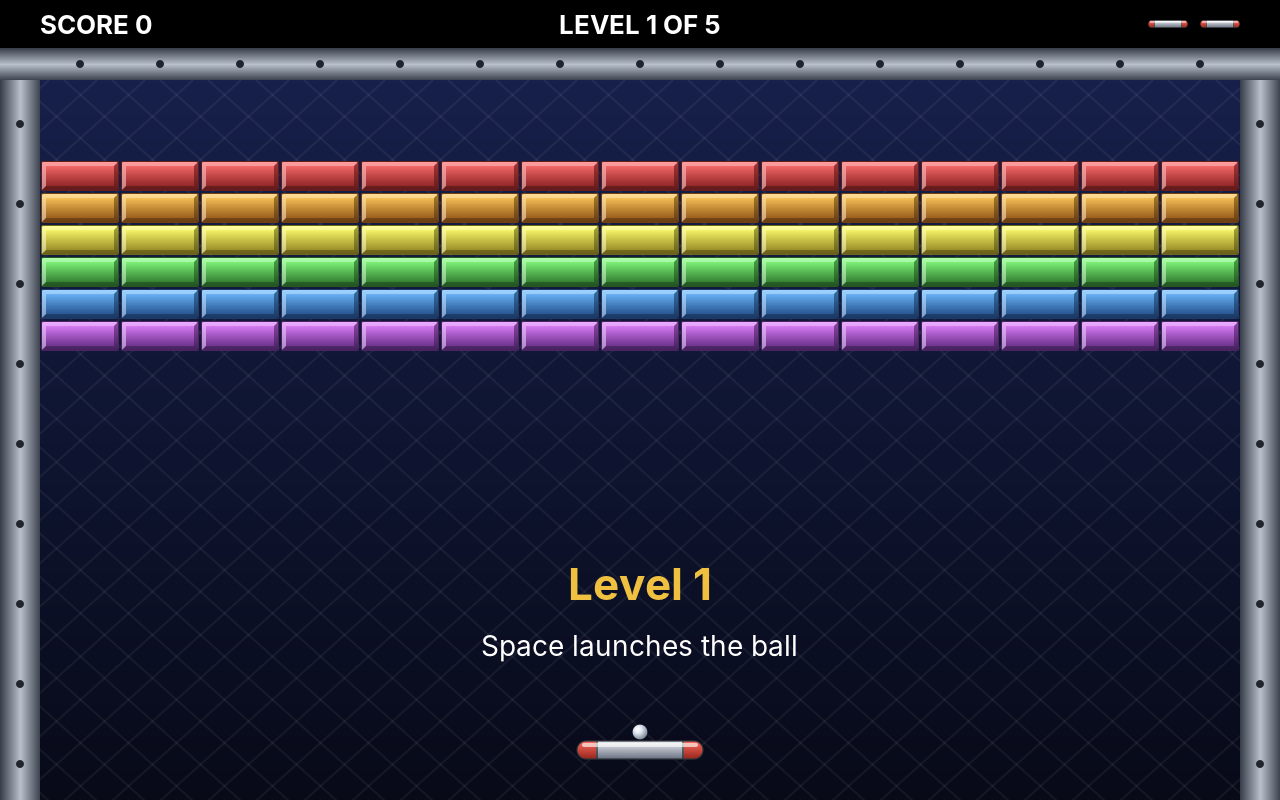
In Paddle, the ball flew between two players. In Bricks it flies against a wall: a paddle at the bottom, a wall of coloured bricks at the top, and every brick the ball touches breaks. Clear the wall, and the next one is waiting. The idea is as old as Paddle's, and it brings two new things into our games at once: many objects on the screen and pictures instead of white rectangles. Paddle's few beeps become a whole set of sounds.
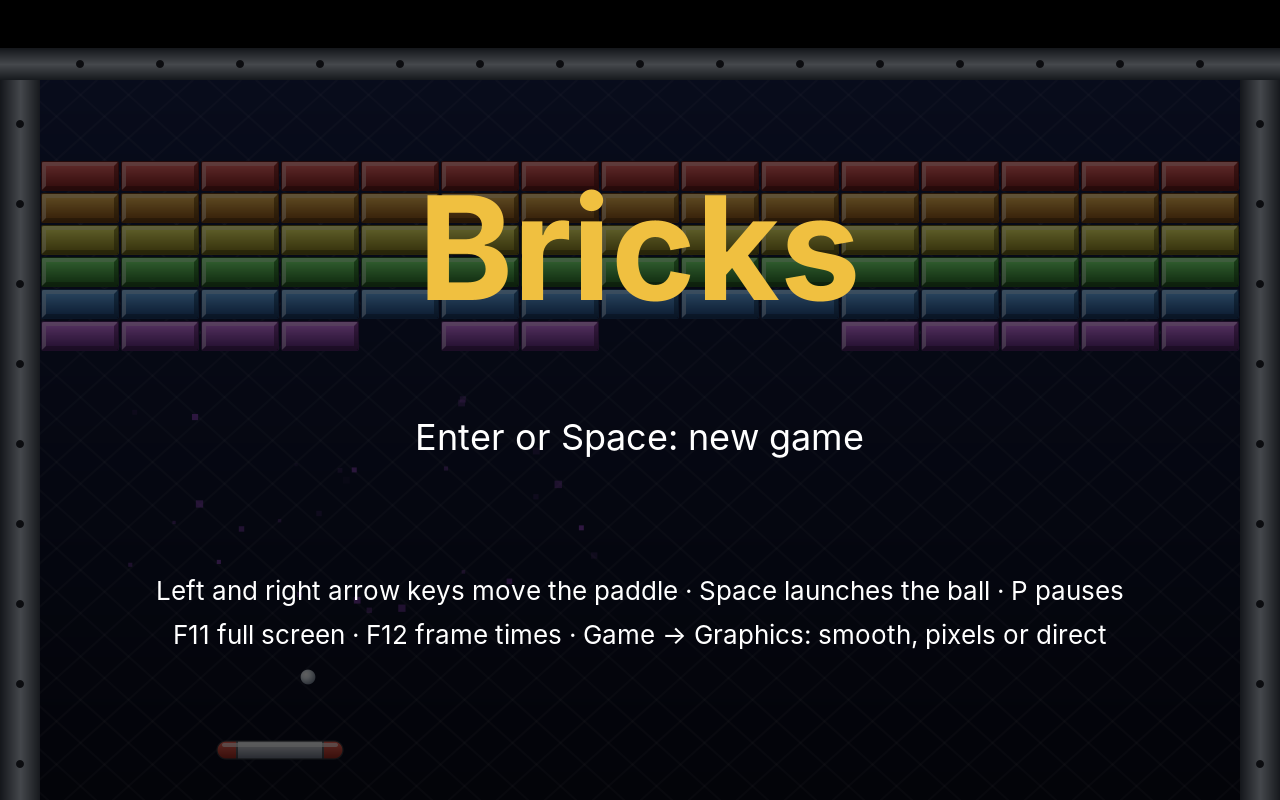
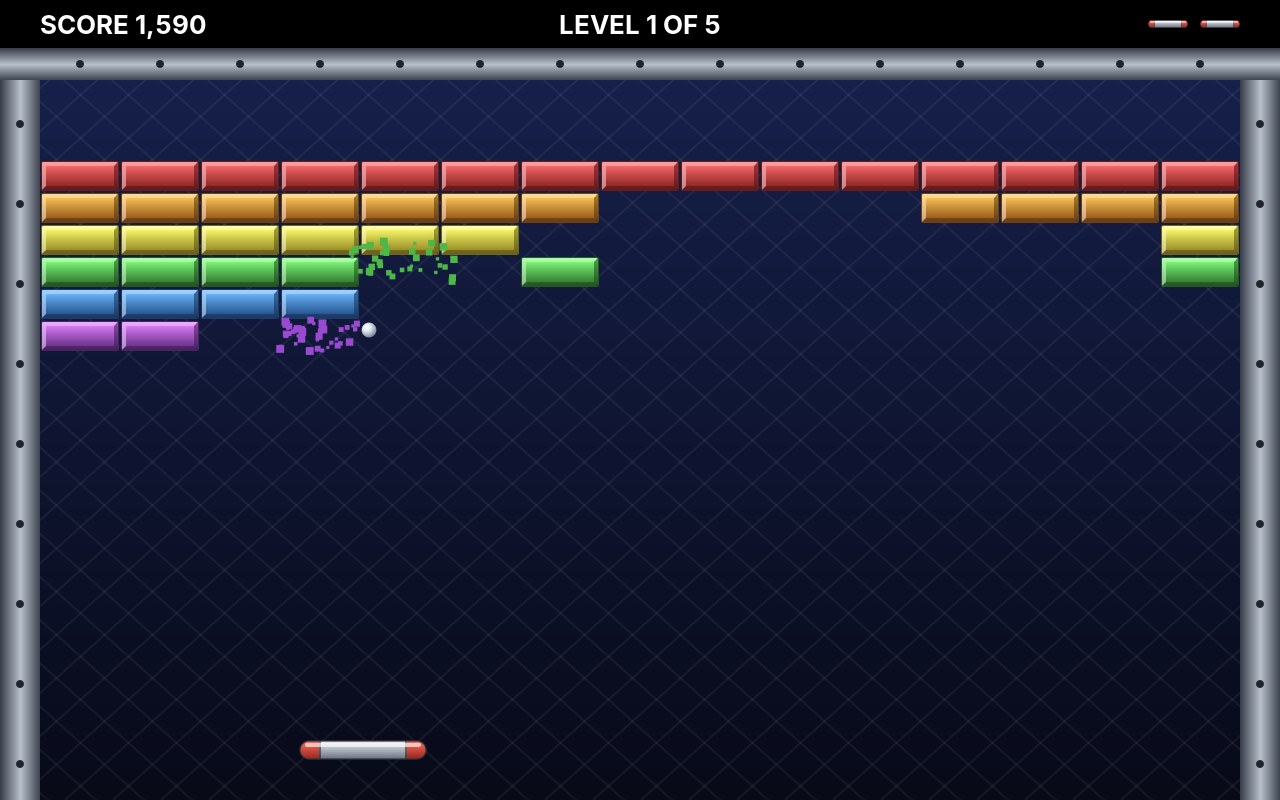
With pictures and splinters, drawing a frame begins to cost real time, and on a large screen it costs a lot more. So this chapter ends with the question every game programmer meets sooner or later: is it fast enough? We will answer it the only reliable way, by measuring, and find out that one of two plausible ideas helps a lot and the other not at all.
What you will learn
- Collision of moving boxes, and a ball that may bounce twice within one step
- Levels as data files that anyone can write
- Events: the rules report what happened, the user interface decides what it looks and sounds like
- Sprites: pictures with a size in logical coordinates, from image files or drawn in code
- Particles: hundreds of splinters without hundreds of objects
- More sound effects: noise for a crash, melodies, and many sounds at once through the mixer
- Measuring frame times, finding what is slow, and fixing it: a sprite cache, a pixel mode, and an idea that did not work
The complete game is in amade-bricks-game.
The rules
- A wall of bricks hangs at the top of the field, between three walls. The player moves a paddle left and right at the bottom.
- The ball lies on the paddle until the player launches it with Space. It bounces off the walls, the bricks and the paddle.
- As in Paddle, where the ball meets the paddle decides its angle: the middle sends it straight up, the edges steeply to the side.
- A coloured brick breaks at the first hit and gives points: the higher its row in the classic wall, the more. Silver bricks take two hits. Gold bricks never break; a level is cleared without them.
- Every hit makes the ball a little faster.
- A ball that falls past the paddle is lost. The player has three; with the last one the game ends.
- When the last breakable brick breaks, the next level begins. There are five; the best scores are kept.
Step 1: The field and the levels
The field is 640 × 400 logical units, like Paddle's court, and its sizes are constants in Field: a band of 24 units at the top for the score, walls 20 units wide, bricks of 40 × 16, fifteen to a row.
The bricks of a level are not code. They are a text file, one line per row, one letter per brick:
# Level 2: a pyramid on a silver base.
.......s.......
......rrr......
.....ooooo.....
....yyyyyyy....
...ggggggggg...
..bbbbbbbbbbb..
.vvvvvvvvvvvvv.
sssssssssssssss
The letters belong to the kinds of brick:
public enum BrickType {
    RED('r', 1, 70), ORANGE('o', 1, 60), YELLOW('y', 1, 50), GREEN('g', 1, 40), BLUE('b', 1, 30),
    VIOLET('v', 1, 20),
    /** Takes two hits. */
    SILVER('s', 2, 100),
    /** Never breaks; a level is cleared without it. */
    GOLD('X', 0, 0);

    private final char letter;
    private final int hits;
    private final int points;

    BrickType(char letter, int hits, int points) {
        this.letter = letter;
        this.hits = hits;
        this.points = points;
    }
Level reads such a file and checks it. A level is the place where a typing mistake is likely, so the error message names the row and the letter:
public record Level(List<String> rows) {
    public Level {
        rows = List.copyOf(rows);
        if (rows.isEmpty() || rows.size() > Field.MAX_ROWS) {
            throw new IllegalArgumentException("a level has 1 to " + Field.MAX_ROWS + " rows, not " + rows.size());
        }
        for (int r = 0; r < rows.size(); r++) {
            String row = rows.get(r);
            if (row.length() != Field.COLUMNS) {
                throw new IllegalArgumentException("row " + (r + 1) + " has " + row.length()
                        + " bricks instead of " + Field.COLUMNS);
            }
            for (char c : row.toCharArray()) {
                if (c != '.' && BrickType.ofLetter(c).isEmpty()) {
                    throw new IllegalArgumentException("row " + (r + 1) + ": unknown brick '" + c + "'");
                }
            }
        }
    }

    /** Reads a level file's text. */
    public static Level parse(String text) {
        List<String> rows = new ArrayList<>();
        for (String line : text.split("\\R")) {
            String row = line.strip();
            if (row.isEmpty() || row.startsWith("#")) continue;
            rows.add(row);
        }
        return new Level(rows);
    }

    /** New bricks for a game of this level. */
    public List<Brick> bricks() {
        List<Brick> bricks = new ArrayList<>();
        for (int r = 0; r < rows.size(); r++) {
            for (int c = 0; c < Field.COLUMNS; c++) {
                int column = c;
                int row = r;
                BrickType.ofLetter(rows.get(r).charAt(c)).ifPresent(type -> bricks.add(new Brick(column, row, type)));
            }
        }
        return bricks;
    }
}
    @Test
    void aLevelIsReadFromText() {
        Level level = Level.parse("""
                # comment
                r.............X
                ..s............
                """);
        List<Brick> bricks = level.bricks();
        assertEquals(3, bricks.size());
        assertEquals(BrickType.RED, bricks.get(0).type());
        assertEquals(Field.LEFT, bricks.get(0).box().x());
        assertEquals(BrickType.GOLD, bricks.get(1).type());
        assertEquals(Field.LEFT + 14 * Field.BRICK_WIDTH, bricks.get(1).box().x());
        assertEquals(BrickType.SILVER, bricks.get(2).type());
        assertEquals(Field.BRICKS_TOP + Field.BRICK_HEIGHT, bricks.get(2).box().y());
    }

    @Test
    void mistakesInALevelAreNamed() {
        var e = assertThrows(IllegalArgumentException.class, () -> Level.parse("rrr"));
        assertTrue(e.getMessage().contains("row 1 has 3 bricks instead of 15"), e.getMessage());
        e = assertThrows(IllegalArgumentException.class, () -> Level.parse("rrrrrrrrrrrrrrq"));
        assertTrue(e.getMessage().contains("unknown brick 'q'"), e.getMessage());
    }
The files lie among the game's resources, numbered. LevelFiles reads 01.txt, 02.txt and so on until a number is missing, so a sixth level is a sixth file and no change to the program:
public final class LevelFiles {
    private static final String FOLDER = "/eu/amadeos/games/bricks/levels/";

    private LevelFiles() {
    }

    public static List<Level> load() {
        List<Level> levels = new ArrayList<>();
        for (int n = 1; ; n++) {
            String name = FOLDER + String.format("%02d.txt", n);
            try (InputStream in = LevelFiles.class.getResourceAsStream(name)) {
                if (in == null) break;
                levels.add(Level.parse(new String(in.readAllBytes(), StandardCharsets.UTF_8)));
            } catch (IOException e) {
                throw new UncheckedIOException("cannot read " + name, e);
            } catch (IllegalArgumentException e) {
                throw new IllegalArgumentException(name + ": " + e.getMessage(), e);
            }
        }
        if (levels.isEmpty()) throw new IllegalStateException("no levels in " + FOLDER);
        return levels;
    }
}
Data, not code
Whatever changes often and is not logic belongs in a data file: levels, maps, the waves of enemies in Swarm, the units of Sands. A designer can change it without a compiler, and a test can check every file at once (LevelFilesTest loads all five and makes sure each has a brick to break).
Step 2: Collision of moving boxes
In Paddle there were two paddles and one ball, and Match tested the paddles' faces by hand. In Bricks the ball can hit any of up to 180 bricks, three walls and the paddle, from any side. That calls for a general tool, and it goes into the engine.
Everything that collides in Bricks is an axis-aligned box: a rectangle whose edges are horizontal and vertical. Two such boxes overlap when they overlap on both axes:
    /** True if the two boxes share an area; boxes that only touch at an edge do not overlap. */
    public boolean overlaps(Box other) {
        return x < other.right() && other.x < right() && y < other.bottom() && other.y < bottom();
    }
That test alone is not enough, as Paddle taught us: a fast ball can be in front of a brick in one step and behind it in the next (tunnelling). We need to know whether the ball touches the brick on its way, and when. That is a swept test:
    /**
     * The first contact of {@code moving}, moved by {@code dx}, {@code dy} during the step, with
     * {@code target}; {@code null} if there is none within the step, or if the boxes already overlap at the
     * start (then the caller has to separate them first).
     */
    public static Hit sweep(Box moving, double dx, double dy, Box target) {
        // The target grown by the moving box: now the moving box is the point (moving.x, moving.y).
        double left = target.x() - moving.width();
        double right = target.right();
        double top = target.y() - moving.height();
        double bottom = target.bottom();

        double[] x = enterAndLeave(moving.x(), dx, left, right);
        double[] y = enterAndLeave(moving.y(), dy, top, bottom);
        if (x == null || y == null) return null;
        double enter = Math.max(x[0], y[0]);
        double leave = Math.min(x[1], y[1]);
        if (enter >= leave || enter > 1 || enter < 0) return null;
        // The axis entered last is the face that was hit.
        if (x[0] > y[0]) return new Hit(enter, dx > 0 ? -1 : 1, 0);
        return new Hit(enter, 0, dy > 0 ? -1 : 1);
    }

    /**
     * When a point starting at {@code p} and moving by {@code d} enters and leaves the range
     * {@code min..max}, as shares of the step; {@code null} if it never is inside.
     */
    private static double[] enterAndLeave(double p, double d, double min, double max) {
        if (d == 0) {
            // Not moving on this axis: inside the whole time or never.
            return p > min && p < max ? new double[]{Double.NEGATIVE_INFINITY, Double.POSITIVE_INFINITY} : null;
        }
        double t1 = (min - p) / d;
        double t2 = (max - p) / d;
        return new double[]{Math.min(t1, t2), Math.max(t1, t2)};
    }
The trick is in the first four lines. A box of 8 × 8 hits a brick of 40 × 16 exactly when its top left corner enters a box that is 8 units larger to the left and to the top: the brick grown by the ball. So the moving box shrinks to a point, and the question becomes where a line enters a rectangle. For each axis the point is inside the rectangle's range during an interval of time; it is inside the rectangle while both intervals overlap. The later of the two entries is the moment of contact, and the axis entered last tells which face was hit, and so in which direction to bounce.
    @Test
    void aBallFasterThanTheBrickIsThickStillHitsIt() {
        // An 8 × 8 ball below the brick, moving 60 units up in one step: it would end above the brick.
        Box ball = new Box(116, 130, 8, 8);
        assertFalse(ball.moved(0, -60).overlaps(BRICK), "the end position alone misses the brick");
        Sweep.Hit hit = Sweep.sweep(ball, 0, -60, BRICK);
        assertNotNull(hit);
        assertEquals(14.0 / 60, hit.time(), 1e-9);  // after 14 units it touches the bottom face
        assertEquals(0, hit.normalX());
        assertEquals(1, hit.normalY());              // bounce down
    }
Bouncing within a step
With the sweep, moving the ball becomes a small loop. Find the first thing the ball touches during the step. If there is none, move the whole way. If there is one, move only up to it, bounce, and go on with the rest of the step:
    /**
     * Moves the ball by one step. It may touch something on its way: then it moves only as far as the
     * contact, bounces, and goes on with the rest of the step, so a ball can bounce twice in one step and
     * never passes through anything.
     */
    private void moveBall(double seconds) {
        catchOverlap();
        double rest = 1;  // the share of the step still to go
        for (int bounces = 0; bounces < 4 && rest > 0; bounces++) {
            double dx = ball.vx() * seconds * rest;
            double dy = ball.vy() * seconds * rest;
            Contact first = firstContact(ball.box(), dx, dy);
            if (first == null) {
                ball.moveBy(dx, dy);
                return;
            }
            double t = first.hit().time();
            ball.moveBy(dx * t, dy * t);
            rest *= 1 - t;
            bounce(first);
            if (phase != Phase.PLAYING) return;  // the last brick broke: the next level waits
        }
    }

    private Contact firstContact(Box box, double dx, double dy) {
        Contact first = null;
        for (Box wall : List.of(Field.LEFT_WALL, Field.RIGHT_WALL, Field.TOP_WALL)) {
            first = earlier(first, Sweep.sweep(box, dx, dy, wall), null, false);
        }
        for (Brick brick : bricks) first = earlier(first, Sweep.sweep(box, dx, dy, brick.box()), brick, false);
        // The paddle only catches a falling ball.
        if (dy > 0) first = earlier(first, Sweep.sweep(box, dx, dy, paddle.box()), null, true);
        return first;
    }
A ball that hits a brick near a wall bounces twice in one step, and neither bounce is lost. Four bounces per step are plenty; the limit only guards against a ball caught between two surfaces. The paddle catches only a falling ball, so a ball that has just left it cannot hit it again from below.
Bouncing mirrors the velocity at the face that was hit. The paddle is the exception, the same as in Paddle: there, the point of contact decides the new angle.
    private void bounce(Contact contact) {
        Sweep.Hit hit = contact.hit();
        if (contact.paddle() && hit.normalY() < 0) {
            bounceOffPaddle();
            return;
        }
        // Mirror the velocity at the face that was hit.
        double vx = hit.normalX() != 0 ? Math.abs(ball.vx()) * hit.normalX() : ball.vx();
        double vy = hit.normalY() != 0 ? Math.abs(ball.vy()) * hit.normalY() : ball.vy();
        ball.setVelocity(vx, vy);
        if (contact.brick() != null) hitBrick(contact.brick());
        else events.add(new Event.Bounce(contact.paddle()));
    }

    /** As in Paddle: where the ball meets the paddle decides the angle, the middle straight up. */
    private void bounceOffPaddle() {
        double reach = (Field.PADDLE_WIDTH + Field.BALL_SIZE) / 2;
        double offset = Math.clamp((ball.centerX() - paddle.centerX()) / reach, -1, 1);
        double angle = offset * Field.MAX_ANGLE;
        ball.setVelocity(speed * Math.sin(angle), -speed * Math.cos(angle));
        events.add(new Event.Bounce(true));
    }
    private void hitBrick(Brick brick) {
        boolean broken = brick.hit();
        events.add(new Event.BrickHit(brick, broken));
        speed = Math.min(Field.BALL_MAX_SPEED, speed + Field.BALL_SPEED_UP);
        ball.setSpeed(speed);
        if (!broken) return;
        score += brick.type().points();
        bricks.remove(brick);
        if (bricks.stream().noneMatch(b -> b.type().breakable())) clearLevel();
    }
The tests put the ball where they want it and let the game run:
    @Test
    void thePaddleFollowsTheMouseFastButStaysBetweenTheWalls() {
        Game game = game(row("r"));
        double start = game.paddle().centerX();
        game.aim(100);
        game.update(STEP, 0, false);
        // One step covers at most the follow speed: no jump through a falling ball.
        assertEquals(start - Field.PADDLE_FOLLOW_SPEED * STEP, game.paddle().centerX(), 1e-9);
        for (int i = 0; i < 60; i++) game.update(STEP, 0, false);
        assertEquals(100, game.paddle().centerX(), 1e-9);
        game.aim(-50);   // over the black bar left of the field
        for (int i = 0; i < 60; i++) game.update(STEP, 0, false);
        assertEquals(Field.LEFT, game.paddle().x(), 1e-9);
    }

    @Test
    void aBrickBreaksScoresAndSendsTheBallBack() {
        Game game = game(row("rr"));
        // Straight up under the first brick (x 20 to 60, bottom at y 80).
        fly(game, 36, 120, 0, -300);
        List<Event> events = run(game, 0.2, STEP);
        Event.BrickHit hit = assertInstanceOf(Event.BrickHit.class, events.getFirst());
        assertEquals(0, hit.brick().column());
        assertTrue(hit.broken());
        assertEquals(70, game.score());
        assertEquals(1, game.bricks().size());
        assertTrue(game.ball().vy() > 0, "bounced down");
    }
    @Test
    void evenAHugeStepCannotCarryTheBallThroughABrick() {
        Game game = game(row("rr"));
        // One step of a tenth of a second: 40 units, more than the brick is high.
        fly(game, 36, 90, 0, -400);
        game.update(0.1, 0, false);
        assertInstanceOf(Event.BrickHit.class, game.events().getFirst());
        // 10 units up to the brick, the rest of the step back down.
        assertTrue(game.ball().y() > 90, "below where it started: " + game.ball().y());
        assertTrue(game.ball().vy() > 0);
    }
A step of a tenth of a second never happens in the game, which steps 120 times a second. The test uses it anyway: if the collision holds at forty units per step, it holds at four.
Pitfall: the paddle moves into the ball
The sweep moves the ball and keeps the brick still. But the paddle moves too. When the player pushes the paddle sideways into a falling ball, the two boxes overlap at the start of the next step, and a sweep that starts inside finds no entry. The ball would fall through the paddle, and the player would rightly call it a bug. Game.catchOverlap() handles that one case before the sweep: a falling ball that overlaps the paddle above its middle counts as caught.
Step 3: Events
When a brick breaks, three things should happen: the score goes up, the brick bursts into splinters, and a sound plays. Only the first one is a rule. Splinters and sound are presentation; they have no place in Game, which knows nothing about pixels or loudspeakers and is tested without either.
So the rules only report what happened during a step, as events:
public sealed interface Event {
    /** The ball hit a brick; {@code broken} if that was its last hit. */
    record BrickHit(Brick brick, boolean broken) implements Event {
    }

    /** The ball bounced off a wall or the paddle. */
    record Bounce(boolean paddle) implements Event {
    }

    record BallLost(int livesLeft) implements Event {
    }

    /** The last breakable brick of a level broke; {@code level} counts from 1. */
    record LevelCleared(int level) implements Event {
    }

    record GameOver(GameResult result) implements Event {
    }
}
The step itself:
    /**
     * One step: the paddle moves ({@code -1} left, {@code +1} right, 0 not), a ball on the paddle is launched
     * if {@code launch}, a flying ball moves and bounces.
     */
    public void update(double seconds, int move, boolean launch) {
        events.clear();
        if (phase == Phase.OVER) return;
        ball.remember();
        paddle.move(move, seconds);
        if (phase == Phase.SERVING) {
            placeOnPaddle();
            if (launch) launch();
            return;
        }
        moveBall(seconds);
        if (phase == Phase.PLAYING && ball.y() > Field.HEIGHT) loseBall();
    }
After every step, the user interface reads the events and turns them into what you see and hear. A sealed interface and records make this a switch that the compiler checks: forget a kind of event, and it does not compile.
    /** Shows and, if {@code audible}, plays what happened in the last step. */
    void react(List<Event> events, boolean audible) {
        for (Event event : events) {
            switch (event) {
                case Event.BrickHit(var brick, var broken) when broken -> {
                    splinters(brick.box(), brick.type().ordinal(), 40);
                    if (audible) play(brick.type() == BrickType.SILVER ? sounds.silver : sounds.brick);
                }
                case Event.BrickHit(var brick, var broken) -> {
                    sparks(brick.box());
                    if (audible) play(brick.type() == BrickType.GOLD ? sounds.gold : sounds.silver);
                }
                case Event.Bounce(var paddle) -> {
                    if (audible) play(paddle ? sounds.paddle : sounds.wall);
                }
                case Event.BallLost lost -> {
                    if (audible) play(lost.livesLeft() > 0 ? sounds.lost : sounds.crash);
                }
                case Event.LevelCleared cleared -> {
                    if (audible) play(sounds.cleared);
                }
                case Event.GameOver over -> {
                    if (audible) play(over.result().won() ? sounds.cleared : sounds.gameOver);
                }
            }
        }
    }
Tests read the same events (events.contains(new Event.LevelCleared(1))), and the title screen's demo uses them too, with sound off.
Step 4: Sprites
Paddle drew white rectangles. Bricks draws pictures: bricks with bevelled edges, a metal paddle, a shiny ball. A picture that moves around in a game is called a sprite.
The engine's Sprite is a picture with a size in logical coordinates. A brick is 40 × 16, whatever its image file says:
    private final Sprite background = Sprite.drawn(Field.WIDTH, Field.HEIGHT, FieldPainter::drawBackground);
    private final Map<BrickType, Sprite> bricks = new EnumMap<>(BrickType.class);
    private final Sprite cracked = load("brick-silver-cracked", Field.BRICK_WIDTH, Field.BRICK_HEIGHT);
    private final Sprite paddle = load("paddle", Field.PADDLE_WIDTH, Field.PADDLE_HEIGHT);
    private final Sprite ball = load("ball", Field.BALL_SIZE, Field.BALL_SIZE);

    FieldPainter() {
        for (BrickType type : BrickType.values()) {
            bricks.put(type, load("brick-" + type.name().toLowerCase(Locale.ROOT),
                    Field.BRICK_WIDTH, Field.BRICK_HEIGHT));
        }
    }

    /** A sprite from the game's images, drawn four times as large as its logical size. */
    static Sprite load(String name, double width, double height) {
        return Sprite.load(FieldPainter.class, "/eu/amadeos/games/bricks/sprites/" + name + ".png", width, height);
    }
The image files are four times as large as the logical size: the brick image is 160 × 64 pixels. Why? Because the canvas scales the logical picture to the screen, and on a 2560 × 1600 screen one logical unit is four pixels. A sprite is only as sharp as its source. A 40 × 16 image enlarged four times is blurred or blocky, whatever the program does; a 160 × 64 image shrunk to the screen's size stays sharp. The images were drawn with Java2D themselves, by tools/MakeSprites.java in the game repository, so you can change them without a paint program.
The background is a sprite too, but without a file: Sprite.drawn takes a piece of Java2D code (a gradient, a lattice of thin lines, the metal walls) that draws it at whatever size it is needed. Vector pictures like this are sharp at any size.
With sprites, the painter is short. The ball and the paddle are drawn between their last two positions, as in Paddle:
    void paint(Graphics2D g, Game game, Particles particles, double alpha) {
        background.draw(g, 0, 0);
        for (Brick brick : game.bricks()) {
            Sprite sprite = brick.cracked() ? cracked : bricks.get(brick.type());
            sprite.draw(g, brick.box().x(), brick.box().y());
        }
        Paddle p = game.paddle();
        paddle.draw(g, p.previousX() + (p.x() - p.previousX()) * alpha, Field.PADDLE_Y);
        if (game.phase() != Game.Phase.OVER) {
            Ball b = game.ball();
            ball.draw(g, b.previousX() + (b.x() - b.previousX()) * alpha,
                    b.previousY() + (b.y() - b.previousY()) * alpha);
        }
        particles.render(g, alpha);
    }
How Sprite.draw brings the picture to the screen is the subject of step 7, because the first, obvious way turned out to be the slowest part of the game.
Step 5: Particles
A breaking brick bursts into forty splinters that fly apart, fall and fade. With a few bricks breaking in quick succession, several hundred splinters are in the air. Each lives for about a second.
The obvious design is a Splinter class and a List<Splinter>. It works, but it creates and discards hundreds of small objects every second, and those objects lie all over memory. The engine's Particles uses another design, common in games: one array per property, and a particle is a row in those arrays.
    /**
     * A new particle at {@code x}, {@code y}, flying at {@code vx}, {@code vy} units per second, living
     * {@code seconds}; false if all rows are taken.
     */
    public boolean spawn(double x, double y, double vx, double vy, double seconds, double size, int colour) {
        if (count == capacity) return false;
        int i = count++;
        this.x[i] = previousX[i] = x;
        this.y[i] = previousY[i] = y;
        this.vx[i] = vx;
        this.vy[i] = vy;
        life[i] = lifetime[i] = seconds;
        this.size[i] = size;
        this.colour[i] = colour;
        return true;
    }
The living particles always fill the first count rows. When one dies, the last living one moves into its row, so the update never shifts arrays and never creates anything:
    /** Moves all particles by one step; {@code gravity} pulls down in units per second². */
    public void update(double seconds, double gravity) {
        int i = 0;
        while (i < count) {
            life[i] -= seconds;
            if (life[i] <= 0) {
                remove(i);
                continue;  // row i now holds the former last particle: look at it again
            }
            previousX[i] = x[i];
            previousY[i] = y[i];
            vy[i] += gravity * seconds;
            x[i] += vx[i] * seconds;
            y[i] += vy[i] * seconds;
            i++;
        }
    }

    private void remove(int i) {
        int last = --count;
        x[i] = x[last];
        y[i] = y[last];
        previousX[i] = previousX[last];
        previousY[i] = previousY[last];
        vx[i] = vx[last];
        vy[i] = vy[last];
        life[i] = life[last];
        lifetime[i] = lifetime[last];
        size[i] = size[last];
        colour[i] = colour[last];
    }
Drawing fades a particle in its second half of life. Fading needs a colour with less opacity, and new Color(...) in a loop over hundreds of particles sixty times a second would undo all the care above. So every colour is made once in sixteen shades, and drawing only picks one:
    /** Draws the particles between their last two positions; they fade during the last half of their life. */
    public void render(Graphics2D g, double alpha) {
        for (int i = 0; i < count; i++) {
            double fade = Math.min(1, 2 * life[i] / lifetime[i]);
            g.setColor(shades[colour[i]][(int) Math.round(fade * (SHADES - 1))]);
            double s = size[i];
            square.setRect(previousX[i] + (x[i] - previousX[i]) * alpha - s / 2,
                    previousY[i] + (y[i] - previousY[i]) * alpha - s / 2, s, s);
            g.fill(square);
        }
    }
The splinters of a brick start where the brick was, fly outward and up, and gravity does the rest:
    /** A broken brick bursts into {@code count} splinters of its colour that fly off and fall. */
    private void splinters(Box box, int colour, int count) {
        for (int i = 0; i < count; i++) {
            double x = box.x() + random.nextDouble() * box.width();
            double y = box.y() + random.nextDouble() * box.height();
            double vx = (x - box.centerX()) * 6 + (random.nextDouble() - 0.5) * 80;
            double vy = -60 - random.nextDouble() * 140;
            particles.spawn(x, y, vx, vy, 0.6 + random.nextDouble() * 0.7, 1.5 + random.nextDouble() * 2.5, colour);
        }
    }
Behind the scenes: why arrays?
Java's garbage collector is good at short-lived objects, and for a few hundred particles a list of objects would be fine too. The arrays pay off when the numbers grow: thousands of particles, the bullets of Swarm, the units of Sands. A loop over an array of double reads memory in order, which processors are fastest at, while a list of objects jumps from one object to the next. Games call this data-oriented design. Here it is mostly a habit worth learning early.
Step 6: Sound
Bricks reuses what Paddle introduced: tones computed from numbers, and the mixer that plays them. Bricks needs it more than Paddle did: a brick can break while the ball hits the wall, and splinters fly while the next brick goes. The sounds of Bricks are a handful of lines, made once when the game starts. Square beeps for bricks, paddle and walls, a clear triangle ping for silver, a long falling tone for a lost ball, noise when the last one is gone, and little melodies for a cleared level and the end:
final class SoundBank {
    final Sound brick = Sound.tone(Wave.SQUARE, 520, 760, 0.05, 0.22);
    final Sound silver = Sound.tone(Wave.TRIANGLE, 1400, 1300, 0.07, 0.35);
    final Sound gold = Sound.tone(Wave.SQUARE, 1800, 1700, 0.04, 0.15)
            .then(Sound.tone(Wave.TRIANGLE, 1800, 1750, 0.08, 0.25));
    final Sound paddle = Sound.tone(Wave.SQUARE, 330, 330, 0.05, 0.22);
    final Sound wall = Sound.tone(Wave.SQUARE, 220, 220, 0.03, 0.15);
    final Sound lost = Sound.tone(Wave.SQUARE, 440, 110, 0.6, 0.2);
    /** C, E, G, high C. */
    final Sound cleared = note(523, 0.1).then(note(659, 0.1)).then(note(784, 0.1)).then(note(1047, 0.3));
    /** G, E, C, falling. */
    final Sound gameOver = note(392, 0.2).then(note(330, 0.2)).then(Sound.tone(Wave.TRIANGLE, 262, 250, 0.5, 0.3));
    final Sound crash = Sound.tone(Wave.NOISE, 0, 0, 0.12, 0.12);

    private static Sound note(double hz, double seconds) {
        return Sound.tone(Wave.TRIANGLE, hz, hz, seconds, 0.3);
    }
}
As in Paddle, the rules only report events, and the effects decide what they sound like (see Step 3).
Step 7: How fast is it?
So far everything in Bricks worked on the first try in a window. Then full screen on a large monitor: the game felt sluggish. Before changing anything, find out what is slow, and by how much. Programmers are notoriously bad at guessing where the time goes, and a guess that turns out wrong costs a day of work for nothing. This section shows that twice.
A display for frame times
At 60 frames per second a frame has 16.7 ms. The engine's FrameTimes keeps the frames of the last second: how long each one took to draw, from the first drawing call until the picture is on the screen.
public final class FrameTimes {
    private static final long WINDOW = 1_000_000_000L;
    private static final int MAX_FRAMES = 1000;

    private final long[] starts = new long[MAX_FRAMES];
    private final long[] durations = new long[MAX_FRAMES];
    private int first;
    private int size;

    /** One frame: drawing began at {@code start} and ended at {@code end}. */
    public synchronized void record(long start, long end) {
        // Forget frames older than one second, and the oldest if the ring is full.
        while (size > 0 && (start - starts[first] > WINDOW || size == MAX_FRAMES)) {
            first = (first + 1) % MAX_FRAMES;
            size--;
        }
        int i = (first + size) % MAX_FRAMES;
        starts[i] = start;
        durations[i] = end - start;
        size++;
    }

    /** Frames drawn within the last second. */
    public synchronized int framesPerSecond() {
        return size;
    }

    /** Average drawing time of the last second's frames, in milliseconds. */
    public synchronized double averageMillis() {
        if (size == 0) return 0;
        long sum = 0;
        for (int k = 0; k < size; k++) sum += durations[(first + k) % MAX_FRAMES];
        return sum / (double) size / 1e6;
    }

    /** The slowest frame of the last second, in milliseconds. */
    public synchronized double maxMillis() {
        long max = 0;
        for (int k = 0; k < size; k++) max = Math.max(max, durations[(first + k) % MAX_FRAMES]);
        return max / 1e6;
    }
}
GameCanvas records every frame and, after F12 (Game → Frame Times), shows the numbers in the top left corner, in screen pixels, over everything else: the screen size, the render mode and its scale, the average and the worst drawing time, and the frames per second. Green means every frame of the last second fitted into 1/60 s, red that at least one did not.

    /** Draws one frame; called by the game loop on its thread. Does nothing while the canvas is not shown. */
    public void render(double alpha) {
        synchronized (frameLock) {
            if (!isDisplayable() || getWidth() <= 0 || getHeight() <= 0) return;
            BufferStrategy buffers = getBufferStrategy();
            if (buffers == null) {
                createBufferStrategy(2);
                return;
            }
            long start = System.nanoTime();
            // The buffers live in video memory and can be lost (another program, a mode switch): draw again.
            do {
                do {
                    Graphics2D g = (Graphics2D) buffers.getDrawGraphics();
                    try {
                        paintFrame(g, alpha);
                    } finally {
                        g.dispose();
                    }
                } while (buffers.contentsRestored());
                buffers.show();
            } while (buffers.contentsLost());
            // Without this, X11 may collect frames and show them in bursts.
            Toolkit.getDefaultToolkit().sync();
            frameTimes.record(start, System.nanoTime());
        }
    }
The worst frame matters more than the average
An average of 8 ms with single frames of 40 ms feels worse than a steady 14 ms: the player sees the 40 ms frame as a jolt. That is why the display shows the maximum next to the average.
Measuring
Looking at the display while playing is a start. For numbers you can compare, the game repository has a benchmark: it opens Bricks in full screen, lets the title screen's demo play, and prints the frame times for each render mode.
./gradlew benchmark                          # on the screen you want to measure
./gradlew benchmark -Pseconds=20 -Pmodes=direct
Our measurements below come from Xvfb, an X server without a graphics card that draws everything with the processor, at four screen sizes. That is the hard case: a computer without a usable graphics driver, or amadeOS in a virtual machine (QEMU) without a virtual graphics card. On your own computer the numbers will be smaller; their proportions are what matters. Run the benchmark on your machine and compare.
The first measurement is the game as it was: each sprite drawn with g.drawImage(image, x, y, width, height), scaled by Java2D from its large source image in every frame, and the background drawn anew from its gradient and lines. (The engine can still do that, for exactly this comparison: ./gradlew benchmark -Pjvm=-Damade.sprites.uncached=true.)
| Screen | Drawing time per frame | Frames per second |
|---|---|---|
| 1280 × 800 | 18.6 ms | 53 |
| 1920 × 1080 | 26.1 ms | 39 |
| 2560 × 1600 | 56.3 ms | 19 |
| 3840 × 2160 | 89.7 ms | 12 |
Already at 1280 × 800 the game does not reach 60 frames per second, and on a 4K screen it is a slide show. The time grows with the screen: roughly in proportion to its pixels. That is the first lesson of this measurement. In Java2D, a frame costs pixels. Every sprite costs as many pixels as it covers on the screen, and scaling an image costs more per pixel than copying one, because each screen pixel is computed from several pixels of the source.
How much of a frame is unavoidable? A frame with nothing in it, only the black background, the buffer shown and Toolkit.sync(), costs 1.0 ms at 1280 × 800 and 11.0 ms at 3840 × 2160 in the same X server. Everything above that is our drawing.
Fix 1: scale once, then copy
The bricks do not change their size from frame to frame. Scaling the same 160 × 64 image down to the same 108 × 43 pixels sixty times a second is wasted work. So the sprite scales its picture once, into an image of exactly the size it has on the screen, and from then on only copies that image:
    /** Draws the sprite with its top left corner at {@code x}, {@code y} in logical coordinates. */
    public void draw(Graphics2D g, double x, double y) {
        AffineTransform t = g.getTransform();
        int rotated = AffineTransform.TYPE_MASK_ROTATION | AffineTransform.TYPE_GENERAL_TRANSFORM;
        if (UNCACHED || (t.getType() & rotated) != 0) {
            // Rotated: no cache can help, scale on the fly.
            drawScaled(g, x, y);
            return;
        }
        int w = Math.max(1, (int) Math.round(width * t.getScaleX()));
        int h = Math.max(1, (int) Math.round(height * t.getScaleY()));
        boolean smooth = g.getRenderingHint(RenderingHints.KEY_INTERPOLATION)
                != RenderingHints.VALUE_INTERPOLATION_NEAREST_NEIGHBOR;
        if (cached == null || cached.getWidth() != w || cached.getHeight() != h || cachedSmooth != smooth) {
            cached = render(g.getDeviceConfiguration(), w, h, smooth);
            cachedSmooth = smooth;
        }
        // Copy the cached picture 1:1 to whole screen pixels: no scaling, no blurring by half pixels.
        double screenX = Math.round(t.getTranslateX() + x * t.getScaleX());
        double screenY = Math.round(t.getTranslateY() + y * t.getScaleY());
        g.setTransform(AffineTransform.getTranslateInstance(screenX, screenY));
        g.drawImage(cached, 0, 0, null);
        g.setTransform(t);
    }
The size on the screen comes from the graphics' transform, which the canvas set up for the logical coordinates: a brick 40 units wide on a canvas scaled 2.7 times is 108 pixels wide. When the window changes size, the transform changes, and the next frame scales once more. The copy is placed on whole screen pixels, with a transform that only moves, so it is a plain copy, never a blurred one.
The cached picture is made like this:
    /** The picture scaled once to {@code w} × {@code h} screen pixels, in the screen's own pixel format. */
    private BufferedImage render(GraphicsConfiguration gc, int w, int h, boolean smooth) {
        BufferedImage image = gc != null
                ? gc.createCompatibleImage(w, h, Transparency.TRANSLUCENT)
                : new BufferedImage(w, h, BufferedImage.TYPE_INT_ARGB_PRE);
        Graphics2D g = image.createGraphics();
        try {
            g.setComposite(AlphaComposite.Src);
            if (drawing != null) {
                g.setRenderingHint(RenderingHints.KEY_ANTIALIASING, smooth
                        ? RenderingHints.VALUE_ANTIALIAS_ON : RenderingHints.VALUE_ANTIALIAS_OFF);
                g.scale(w / width, h / height);
                g.setComposite(AlphaComposite.SrcOver);
                drawing.draw(g, width, height);
            } else if (smooth) {
                g.setRenderingHint(RenderingHints.KEY_INTERPOLATION, RenderingHints.VALUE_INTERPOLATION_BICUBIC);
                g.drawImage(halvedTowards(source, w, h), 0, 0, w, h, null);
            } else {
                g.setRenderingHint(RenderingHints.KEY_INTERPOLATION,
                        RenderingHints.VALUE_INTERPOLATION_NEAREST_NEIGHBOR);
                g.drawImage(source, 0, 0, w, h, null);
            }
        } finally {
            g.dispose();
        }
        return image;
    }
Two details matter here. First, the image is made with createCompatibleImage of the screen's GraphicsConfiguration: it has the screen's own pixel format, so copying it needs no conversion, and Java2D can keep a copy in video memory where there is one (a managed image). Second, shrinking a picture to less than half in one step looks rough, because bicubic interpolation only looks at the nearest source pixels; halvedTowards shrinks in halves first.
    @Test
    void theSpriteIsScaledOnceToItsSizeOnTheScreen() {
        Sprite brick = Sprite.of(source(), 20, 8);   // shown at half the source's pixels
        assertNull(brick.cachedSize());
        BufferedImage screen = new BufferedImage(200, 100, BufferedImage.TYPE_INT_ARGB);
        Graphics2D g = screen.createGraphics();
        g.scale(3, 3);                                // three screen pixels per logical unit
        brick.draw(g, 10, 5);
        assertEquals(new Dimension(60, 24), brick.cachedSize());
        // At 3 × (10, 5): red on the left, blue on the right.
        assertEquals(Color.RED.getRGB(), screen.getRGB(31, 16));
        assertEquals(Color.BLUE.getRGB(), screen.getRGB(88, 37));
        assertEquals(0, screen.getRGB(29, 16));
        g.dispose();
    }
The same measurement again:
| Screen | Before | Sprites scaled once | Frames per second |
|---|---|---|---|
| 1280 × 800 | 18.6 ms | 3.2 ms | 60 |
| 1920 × 1080 | 26.1 ms | 5.9 ms | 60 |
| 2560 × 1600 | 56.3 ms | 10.9 ms | 60 |
| 3840 × 2160 | 89.7 ms | 19.0 ms | 53 |
Four to six times faster, with one change in one class, and the picture looks exactly the same. Up to 2560 × 1600 the game now draws 60 frames per second even without a graphics card, and on the 4K screen it nearly does.
A fix that was not one
Before measuring, we had a different plan, and it sounded convincing. Draw the world not at the screen's full size but into a hidden back buffer at a whole multiple of the logical size, the largest that fits (on 1920 × 1080, two times 640 × 400, so 1280 × 800), and stretch that buffer to the screen with one smooth (bilinear) scaling at the end. Fewer pixels to draw, and the rest of the scaling, less than a factor of two, would hardly show.
We built it as a render mode, Smooth, and measured it, with the sprite cache already in place (in one run, before the mode was removed again, so the numbers differ a little from the tables around it):
| Screen | Sprites scaled once | Back buffer, stretched |
|---|---|---|
| 1280 × 800 | 4.1 ms | 4.4 ms |
| 1920 × 1080 | 7.2 ms | 10.2 ms |
| 2560 × 1600 | 13.9 ms | 17.0 ms |
| 3840 × 2160 | 26.0 ms | 44.2 ms |
Slower everywhere, and on the 4K screen much slower. An empty frame showed why: in this mode it cost 27.8 ms at 3840 × 2160 instead of 11.0 ms. The back buffer saves little drawing once the sprites are only copied (at 4K, five times 640 × 400 is 3200 × 2000, nearly the screen), but stretching it with interpolation is a second pass over every pixel of the screen, and without a graphics card that pass is expensive. On a graphics card with a fast driver, stretching may cost almost nothing; then the mode would be about as fast as drawing directly, and still not faster.
So the mode was removed again. That is not a failure. It is what measuring is for: the idea was plausible, the numbers said no, and the engine stayed simpler.
Pixel mode
One variant of the back buffer is worth keeping, for a different reason. Draw the world at exactly 640 × 400, and enlarge it by a whole factor with nearest-neighbour interpolation: every logical pixel becomes a square of 2 × 2, 3 × 3 or 4 × 4 screen pixels, and black bars fill the rest. That is the look of the games of the 1980s and 1990s, hard square pixels, and it is what pixel-art games want.
    /** The world at the logical size, enlarged by a whole factor with hard edges; black bars around it. */
    private void paintPixels(Graphics2D g, double alpha) {
        Dimension screen = toScreenPixels(g);
        int n = wholeScale(screen.width, screen.height, logicalWidth, logicalHeight);
        VolatileImage world = drawWorld(alpha);
        int x = (screen.width - logicalWidth * n) / 2;
        int y = (screen.height - logicalHeight * n) / 2;
        g.setColor(Color.BLACK);
        g.fillRect(0, 0, screen.width, screen.height);
        g.setRenderingHint(RenderingHints.KEY_INTERPOLATION, RenderingHints.VALUE_INTERPOLATION_NEAREST_NEIGHBOR);
        g.drawImage(world, x, y, logicalWidth * n, logicalHeight * n, null);
        paintOverlay(g, x, y, n, alpha);
    }
The back buffer is a VolatileImage, an image that lives in video memory where there is one. Like the screen's own buffers, it can be lost at any moment (a mode switch, another program taking the graphics card), so it is checked before and after drawing, with the same kind of loop as BufferStrategy:
    /**
     * Draws the world into the back buffer, at the logical size. The back buffer is a {@link VolatileImage}:
     * it lives in video memory where there is one, and like the screen's buffers it can be lost, so it is
     * checked before and after drawing.
     */
    private VolatileImage drawWorld(double alpha) {
        GraphicsConfiguration gc = getGraphicsConfiguration();
        do {
            // A new monitor or a lost graphics card: make the buffer anew.
            if (backBuffer == null || backBuffer.validate(gc) == VolatileImage.IMAGE_INCOMPATIBLE) {
                if (backBuffer != null) backBuffer.flush();
                backBuffer = gc.createCompatibleVolatileImage(logicalWidth, logicalHeight);
            }
            Graphics2D g = backBuffer.createGraphics();
            try {
                g.setColor(Color.BLACK);
                g.fillRect(0, 0, logicalWidth, logicalHeight);
                // Hard pixels: no antialiasing, and sprites shrunk without blending.
                g.setRenderingHint(RenderingHints.KEY_ANTIALIASING, RenderingHints.VALUE_ANTIALIAS_OFF);
                g.setRenderingHint(RenderingHints.KEY_TEXT_ANTIALIASING, RenderingHints.VALUE_TEXT_ANTIALIAS_OFF);
                g.setRenderingHint(RenderingHints.KEY_INTERPOLATION,
                        RenderingHints.VALUE_INTERPOLATION_NEAREST_NEIGHBOR);
                painter.paint(g, alpha);
            } finally {
                g.dispose();
            }
        } while (backBuffer.contentsLost());
        return backBuffer;
    }
The factor is the largest whole number that fits:
    @Test
    void pixelsAreEnlargedByTheLargestWholeFactorThatFits() {
        assertEquals(1, GameCanvas.wholeScale(640, 400, 640, 400));
        assertEquals(1, GameCanvas.wholeScale(1000, 700, 640, 400));
        assertEquals(2, GameCanvas.wholeScale(1920, 1080, 640, 400));   // 1280 × 800 with wide black bars
        assertEquals(4, GameCanvas.wholeScale(2560, 1600, 640, 400));   // exactly 4: no bars at all
        assertEquals(5, GameCanvas.wholeScale(3840, 2160, 640, 400));   // 3200 × 2000
        assertEquals(1, GameCanvas.wholeScale(300, 200, 640, 400));     // smaller than logical: still 1
    }
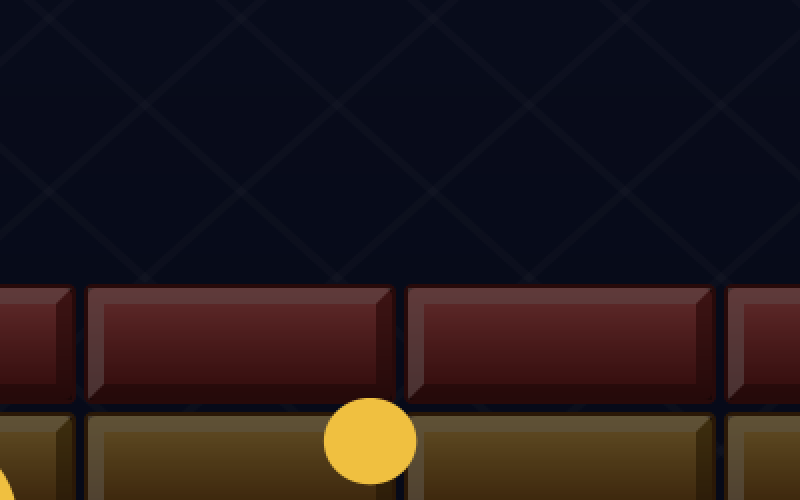
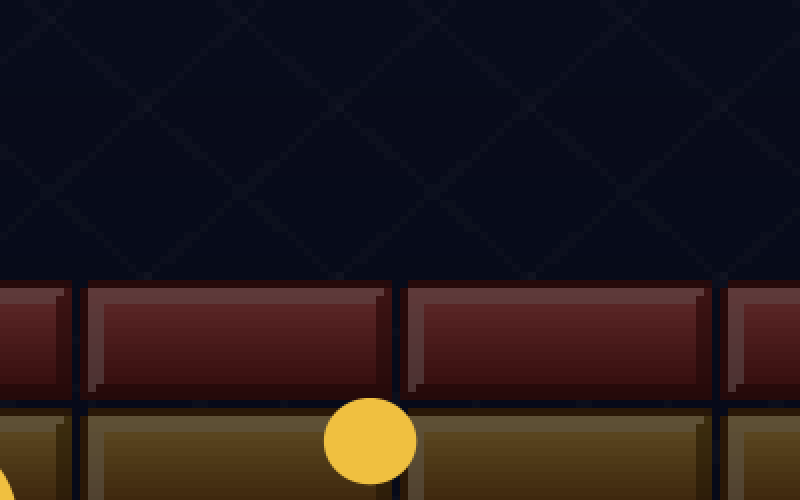
In pixel mode the world costs 256,000 pixels to draw on any screen; only the final enlargement grows with the screen, and it is a simple copy without interpolation. When drawing is expensive, this is the mode that stays fast: without the sprite cache, pixel mode needed 21.4 ms per frame at 3840 × 2160, against 89.7 ms for direct drawing. With the cache, both modes are close: 19.0 ms direct, 16.9 ms in pixel mode.
| Screen | Direct, sprites scaled once | Pixel mode |
|---|---|---|
| 1280 × 800 | 3.2 ms | 3.4 ms |
| 1920 × 1080 | 5.9 ms | 4.0 ms |
| 2560 × 1600 | 10.9 ms | 10.2 ms |
| 3840 × 2160 | 19.0 ms | 16.9 ms |
| 2560 × 1600, Windows with a graphics card | not measured | 6.5 ms |
The last row is the same benchmark on real hardware: a Windows computer, where Java2D draws through Direct3D on the graphics card, with a 2560 × 1600 screen in pixel mode, enlarged three times. The frame-time display read 6.5 ms on average and 7.0 ms at most, at 62 frames per second. That is about a third less than Xvfb's 10.2 ms in the same mode and size, and the low maximum matters as much as the average: no frame of that second came close to the 16.7 ms budget. The 62 frames per second are the monitor's refresh rate, not the game's limit; a frame waits for the screen, and more than half of each frame's time is left over.
The render modes are an engine enum, and GameMenus.graphics builds the submenu Game → Graphics for them:
public enum RenderMode {
    /**
     * Everything is drawn at the full size of the screen, through one scaling transform. Sharp, but every
     * shape and image costs as many pixels as it covers on the screen: on a 4K screen about 30 times as
     * many as at 640 × 400.
     */
    DIRECT,
    /**
     * The world is drawn at the logical size itself, then enlarged by a whole factor with hard pixel edges:
     * the look of old games. Drawing costs 640 × 400 pixels on any screen; black bars fill what is left.
     */
    PIXEL;
Bricks starts in direct mode and remembers the player's choice in bricks.properties.
Two layers: the world and the overlay
In pixel mode, the score in the top band would be drawn at 640 × 400 too, as blocky letters. Text should stay sharp. So a frame now has two layers. The world (field, sprites, particles) goes through the render mode. The overlay (score, level, lives, the texts of the title and pause screens) is drawn afterwards, straight onto the screen, in the same logical coordinates.
The window passes two painters to the canvas:
        // The canvas is a heavyweight AWT component: lightweight menus would open behind it.
        JPopupMenu.setDefaultLightWeightPopupEnabled(false);
        ToolTipManager.sharedInstance().setLightWeightPopupEnabled(false);
        // Two layers: the world, and the overlay with score and texts, always at the screen's full size.
        canvas = new GameCanvas((int) Field.WIDTH, (int) Field.HEIGHT, game::render, game::renderOverlay);
        keyboard.attach(canvas);
        mouse.attach(canvas);
        // The paddle is the pointer: over the field, the mouse pointer is hidden.
        canvas.setCursor(Toolkit.getDefaultToolkit().createCustomCursor(
                new BufferedImage(1, 1, BufferedImage.TYPE_INT_ARGB), new Point(), "none"));
and a scene has a second drawing method, empty unless the scene needs it:
public interface Scene {
    /** Advances by one fixed step of {@code seconds}. */
    void update(double seconds);

    /**
     * Draws the scene.
     *
     * @param alpha how far the time is between the last step and the next, 0 to 1, for smooth movement
     */
    void render(Graphics2D g, double alpha);

    /**
     * Draws what lies on top of the world, such as the score or a text, in the same coordinates. The
     * {@link eu.amadeos.gameengine.swing.GameCanvas} draws it last, straight onto the screen, so text stays
     * sharp whatever the render mode. Nothing by default.
     */
    default void renderOverlay(Graphics2D g, double alpha) {
    }
}
The scene stack draws all worlds first, then all overlays, so a pause text lies over everything. Bricks' status band is an overlay:
    /** Score on the left, level in the middle, the remaining balls as small paddles on the right. */
    void status(Graphics2D g, Game game) {
        g.setFont(small);
        FontMetrics fm = g.getFontMetrics();
        g.setColor(CHALK);
        g.drawString(msg.format("hud.score", game.score()), (float) Field.LEFT, 17f);
        String level = msg.format("hud.level", game.level(), game.levelCount());
        g.drawString(level, (float) (Field.WIDTH - fm.stringWidth(level)) / 2, 17f);
        for (int i = 0; i < game.lives() - 1; i++) {
            life.draw(g, Field.RIGHT - 20 - i * 26, 10);
        }
    }
Why HUD?
Head-up display: in aircraft, the instruments projected onto the windscreen, so the pilot sees them over the world outside. Games took the name for everything drawn over the playing field.
What the measurements taught
- Measure before you optimise, and after. The frame-time display costs a few lines and answers questions that guessing gets wrong.
- A frame costs pixels. Drawing time grows with the area drawn, not with the number of calls. Large screens multiply every cost.
- Scale once, copy often. Pictures that do not change size are scaled once into compatible images. This was the biggest win by far.
- Don't create objects in the loop. Colours, fonts and shapes are made once (
Particles,Hud). - An optimisation that measures no faster is removed again, however convincing it sounded.
These rules, and the traps of Java2D on Linux behind them, are collected in the appendix Java2D and X11 Pitfalls.
Step 8: The mouse
A breakout game asks for the mouse: the hand moves, the paddle moves with it. Bricks can be played with both. The mouse steers the paddle, and a left click does what Enter or Space does: it starts a game, launches the ball, and continues after a pause or at the end.
Where is the mouse in the game?
A mouse event says where the pointer is in the canvas, in the canvas's own units: 0 to 1920 across a full HD screen, say. The game thinks in 640 × 400. Between the two lie exactly the steps the canvas takes when it draws: the scale, the black bars, and in pixel mode a whole factor and whole-pixel offsets. So the conversion belongs to the canvas, and it does the same steps backwards:
    /**
     * Where a point of the component (a mouse event's {@code x} and {@code y}) lies in logical coordinates,
     * placed exactly as the current render mode places the picture. Outside the picture, e.g. on a black
     * bar, the result lies outside 0 … logical size.
     */
    public Point2D.Double toLogical(double x, double y) {
        GraphicsConfiguration gc = getGraphicsConfiguration();
        double ui = gc == null ? 1 : gc.getDefaultTransform().getScaleX();
        return toLogical(x * ui, y * ui, (int) Math.round(getWidth() * ui), (int) Math.round(getHeight() * ui),
                logicalWidth, logicalHeight, mode);
    }

    /** {@link #toLogical(double, double)} for a screen of {@code width} × {@code height} pixels. */
    public static Point2D.Double toLogical(double x, double y, int width, int height,
                                           int logicalWidth, int logicalHeight, RenderMode mode) {
        if (mode == RenderMode.PIXEL) {
            // Whole pixels, as in paintPixels: the picture starts at a whole pixel, each logical unit is n pixels.
            int n = wholeScale(width, height, logicalWidth, logicalHeight);
            int left = (width - logicalWidth * n) / 2;
            int top = (height - logicalHeight * n) / 2;
            return new Point2D.Double((x - left) / n, (y - top) / n);
        }
        double scale = scale(width, height, logicalWidth, logicalHeight);
        double left = (width - logicalWidth * scale) / 2;
        double top = (height - logicalHeight * scale) / 2;
        return new Point2D.Double((x - left) / scale, (y - top) / scale);
    }
On a HiDPI screen the canvas's units are not its pixels, so the instance method first turns the event's units into pixels, as toScreenPixels does for drawing. A test checks both modes on a full HD screen: drawn directly, the picture is 2.7 times larger with bars of 96 pixels; in pixel mode it is twice as large with bars of 320 and 140 pixels.
    @Test
    void mousePositionsAreMappedLikeThePicture() {
        // 1920 × 1080 drawn directly: scaled 2.7 times to 1728 × 1080, with black bars of 96 pixels left and right.
        Point2D.Double p = GameCanvas.toLogical(96, 0, 1920, 1080, 640, 400, RenderMode.DIRECT);
        assertEquals(0, p.x, 1e-9);
        assertEquals(0, p.y, 1e-9);
        p = GameCanvas.toLogical(960, 540, 1920, 1080, 640, 400, RenderMode.DIRECT);
        assertEquals(320, p.x, 1e-9);
        assertEquals(200, p.y, 1e-9);
        // In pixel mode the same screen shows 2 × 640 × 400 = 1280 × 800, starting at 320, 140.
        p = GameCanvas.toLogical(320, 140, 1920, 1080, 640, 400, RenderMode.PIXEL);
        assertEquals(0, p.x, 1e-9);
        assertEquals(0, p.y, 1e-9);
        p = GameCanvas.toLogical(1599, 939, 1920, 1080, 640, 400, RenderMode.PIXEL);
        assertEquals(639.5, p.x, 1e-9);
        assertEquals(399.5, p.y, 1e-9);
        // On a black bar: outside the field.
        assertTrue(GameCanvas.toLogical(10, 540, 1920, 1080, 640, 400, RenderMode.PIXEL).x < 0);
    }
The mouse as an input device
For the game loop, the mouse is like the keyboard: the Swing thread reports what happens, the loop asks once per step. Mouse keeps the last position in logical coordinates and remembers moves and clicks until the next poll, so a short click between two steps is not lost:
public final class Mouse {
    private double x = Double.NaN;
    private double y = Double.NaN;
    private boolean movedSincePoll;
    private boolean moved;
    private int pressedSincePoll;   // one bit per button
    private int pressed;
    private int downNow;     // one bit per button, as the Swing thread last saw it
    private int down;

    /** Listens to the canvas; positions are converted the way the canvas currently draws. */
    public void attach(GameCanvas canvas) {
        MouseAdapter listener = new MouseAdapter() {
            @Override
            public void mouseMoved(MouseEvent e) {
                Point2D.Double p = canvas.toLogical(e.getX(), e.getY());
                moved(p.x, p.y);
            }

            @Override
            public void mouseDragged(MouseEvent e) {
                mouseMoved(e);
            }

            @Override
            public void mousePressed(MouseEvent e) {
                canvas.requestFocusInWindow();   // a click into the game gives the keys to the game, too
                pressed(e.getButton());
            }

            @Override
            public void mouseReleased(MouseEvent e) {
                released(e.getButton());
            }
        };
        canvas.addMouseListener(listener);
        canvas.addMouseMotionListener(listener);
    }

    public synchronized void moved(double x, double y) {
        this.x = x;
        this.y = y;
        movedSincePoll = true;
    }

    public synchronized void pressed(int button) {
        if (button > 0 && button < 32) {
            pressedSincePoll |= 1 << button;
            downNow |= 1 << button;
        }
    }

    public synchronized void released(int button) {
        if (button > 0 && button < 32) downNow &= ~(1 << button);
    }

    /** Call once per update step on the game loop thread, before asking. */
    public synchronized void poll() {
        moved = movedSincePoll;
        pressed = pressedSincePoll;
        down = downNow;
        movedSincePoll = false;
        pressedSincePoll = 0;
    }

    /** The last position in logical coordinates; {@code NaN} until the mouse has moved over the canvas. */
    public synchronized double x() {
        return x;
    }

    public synchronized double y() {
        return y;
    }

    /** True if the mouse moved between the last two polls. */
    public synchronized boolean wasMoved() {
        return moved;
    }

    /** True if the button ({@link MouseEvent#BUTTON1} …) went down between the last two polls. */
    public synchronized boolean wasPressed(int button) {
        return button > 0 && button < 32 && (pressed & 1 << button) != 0;
    }

    /** True if the button was held down at the last poll: for actions that last as long as it is held. */
    public synchronized boolean isDown(int button) {
        return button > 0 && button < 32 && (down & 1 << button) != 0;
    }
}
A click into the canvas also gives it the keyboard focus, so after a click into the menu bar the keys reach the game again.
The paddle follows
The rules get one new method, Game.aim(x): the paddle's centre heads for x. It does not jump there. In each step it moves at most Field.PADDLE_FOLLOW_SPEED, 1600 units per second or about 13 units per step. That is fast enough to feel like a direct hold on the paddle, and slow enough that the paddle never jumps through a falling ball in one step: the collision rules of step 2 stay as they were. Whatever was used last steers. An arrow key forgets the mouse's aim, and the next move of the mouse sets it again.
The window attaches the mouse to the canvas next to the keyboard (see BricksWindow above) and hides the pointer over the field: the paddle is the pointer. A test plays with the mouse alone:
    @Test
    void aClickStartsAndLaunchesThePaddleFollowsTheMouse() {
        mouse.pressed(MouseEvent.BUTTON1);
        steps(1);
        BricksGame.PlayScene play = assertInstanceOf(BricksGame.PlayScene.class, game.top());
        mouse.moved(100, 300);
        steps(60);
        assertEquals(100, play.game().paddle().centerX(), 1e-9);
        // The keys take over until the mouse moves again.
        keyboard.pressed(KeyEvent.VK_RIGHT, now[0]);
        steps(30);
        keyboard.released(KeyEvent.VK_RIGHT, now[0]);
        steps(4);
        assertTrue(play.game().paddle().centerX() > 150, "the keys moved it");
        mouse.pressed(MouseEvent.BUTTON1);
        steps(1);
        assertEquals(Game.Phase.PLAYING, play.game().phase());
    }
Step 9: Putting it together
The running game has the same parts as Paddle: a loop, controls, scenes, and the Arena for the presenter. The play scene reads the keys and the mouse, steps the game and passes the events to the effects; when the game ends, it hands the result to the Swing thread:
    /** A game: the paddle follows the keys or the mouse, the events become splinters and sounds. */
    final class PlayScene implements Scene {
        private final Game game = new Game(levels, random);

        PlayScene() {
            effects.clear();
        }

        @Override
        public void update(double seconds) {
            if (controls.wasPressed(Action.PAUSE)) {
                scenes.push(new PauseScene());
                return;
            }
            if (mouse.wasMoved()) game.aim(mouse.x());
            boolean launch = controls.wasPressed(Action.LAUNCH) || mouse.wasPressed(MouseEvent.BUTTON1);
            game.update(seconds, controls.axis(Action.LEFT, Action.RIGHT), launch);
            effects.react(game.events(), true);
            effects.update(seconds);
            for (Event event : game.events()) {
                if (event instanceof Event.GameOver(GameResult result)) {
                    scenes.replace(new OverScene(game, result));
                    // The presenter lives on the Swing thread: hand the result over there.
                    Consumer<GameResult> listener = onGameOver;
                    ui.execute(() -> listener.accept(result));
                }
            }
        }

        @Override
        public void render(Graphics2D g, double alpha) {
            field.paint(g, game, effects.particles(), alpha);
        }

        @Override
        public void renderOverlay(Graphics2D g, double alpha) {
            hud.status(g, game);
            if (game.phase() == Game.Phase.SERVING) {
                hud.text(g, msg.format("play.level", game.level()), 300, 22, true, Hud.GOLD);
                hud.text(g, msg.get("play.launch"), 328, 14, false, Hud.CHALK);
            }
        }

        Game game() {
            return game;
        }
    }
The menu adds the new engine entries: Graphics with its render modes, Frame Times on F12, and Sound:
    private JMenuBar menuBar() {
        JMenu game = menus.game();
        game.add(focusing(menus.newGame(() -> presenter.newGame())));
        // No shortcut: P is the game's own pause key.
        JMenuItem pause = Mnemonics.apply(new JMenuItem(), msg.get("menu.game.pause"));
        pause.setName("game-pause");
        pause.addActionListener(e -> presenter.pause());
        game.add(focusing(pause));
        game.addSeparator();
        game.add(sound);
        graphics = menus.graphics(RenderMode.DIRECT, mode -> {
            presenter.setRenderMode(mode);
            canvas.requestFocusInWindow();
        });
        game.add(graphics);
        game.add(focusing(menus.frameTimes(canvas::setShowFrameTimes)));
        game.add(focusing(menus.fullScreen(fullScreen::toggle)));
        game.addSeparator();
        game.add(menus.highScores(() -> presenter.showScores()));
        game.addSeparator();
        game.add(menus.exit(this::dispose));
        JMenu help = menus.help();
        help.add(menus.about(msg.get("window.title"), () -> presenter.showAbout()));
        JMenuBar bar = new JMenuBar();
        bar.add(game);
        bar.add(help);
        return bar;
    }
main starts the mixer before the window, and closes it with the game:
    public static void main(String[] args) {
        AmadeApplication.launch(APP, injector -> {
            Mixer mixer = injector.getInstance(Mixer.class);
            mixer.start();
            BricksWindow window = injector.getInstance(BricksWindow.class);
            BricksPresenter presenter = injector.getInstance(BricksPresenter.class);
            BricksGame game = injector.getInstance(BricksGame.class);
            window.bind(presenter);
            presenter.start();
            window.whenClosed(() -> {
                game.stop();
                mixer.close();
                System.exit(0);
            });
            window.setLocationByPlatform(true);
            window.setVisible(true);
            game.start(window.canvas());
        }, new BricksModule());
    }
The title screen lets the computer play, as in Paddle. Its autopilot looks where the falling ball will reach the paddle, folding the path at the walls like Paddle's computer player, and meets it a little off the middle, so the shots go to all sides. Ten minutes of it run in a test in under a second:
    /** Ten minutes of the title screen's demo on the real levels, in well under a second. */
    @Test
    void theDemoKeepsTheBallInTheFieldAndBreaksBricks() {
        List<Level> levels = LevelFiles.load();
        SplittableRandom random = new SplittableRandom(7);
        Game game = new Game(levels, random);
        Autopilot pilot = new Autopilot(random);
        int broken = 0;
        int lost = 0;
        int highestLevel = 1;
        for (int step = 0; step < 10 * 60 * 120; step++) {
            game.update(STEP, pilot.move(game), pilot.launch(game, STEP));
            for (Event e : game.events()) {
                if (e instanceof Event.BrickHit hit && hit.broken()) broken++;
                if (e instanceof Event.BallLost) lost++;
            }
            Ball b = game.ball();
            assertTrue(b.x() >= Field.LEFT - 1e-6 && b.x() + Field.BALL_SIZE <= Field.RIGHT + 1e-6,
                    "ball left the field at x " + b.x());
            assertTrue(b.y() >= Field.TOP - 1e-6, "ball went through the top wall: " + b.y());
            highestLevel = Math.max(highestLevel, game.level());
            if (game.phase() == Game.Phase.OVER) game = new Game(levels, random);
        }
        System.out.printf("demo: %d bricks broken, %d balls lost, up to level %d%n", broken, lost, highestLevel);
        assertTrue(broken > 200, "bricks broken: " + broken);
        assertTrue(highestLevel >= 2, "reached level " + highestLevel);
    }
What moved into the engine
| From Bricks | Engine package | Why |
|---|---|---|
| Boxes and swept collision | eu.amadeos.gameengine.collision |
Every action game needs to know what hits what |
| Sprites with a cache per screen size | eu.amadeos.gameengine.sprite |
Pictures in logical coordinates, fast on any screen |
| Particles in arrays | eu.amadeos.gameengine.fx |
Splinters, sparks, explosions, without garbage |
| Frame times | eu.amadeos.gameengine.loop.FrameTimes |
Measuring belongs in every game |
| Render modes, the overlay, the frame-time display | eu.amadeos.gameengine.swing.GameCanvas, RenderMode, GameMenus |
Pixel look and sharp text, in every game |
| A scene's overlay | eu.amadeos.gameengine.scene.Scene |
Score and texts over the world |
| The mouse in logical coordinates | eu.amadeos.gameengine.input.Mouse, GameCanvas.toLogical |
Pointing at the game, whatever the window size and render mode |
What stays in the game: the field, the bricks and levels, the rules of the ball, the autopilot, the painters, the sounds and the scenes.
Exercises
- A new level. Write
06.txt. Can you design one that the autopilot cannot clear? Run the demo test with your level and find out. - Power-ups. In the classic game, some bricks drop a capsule when they break: a wider paddle, a slower ball, three balls at once. Add an event
PowerUpDropped, let the capsule fall, and catch it with the paddle. Which parts ofGameassume there is exactly one ball? - Measure your own computer. Run
./gradlew benchmarkon your screen, with and without-Damade.sprites.uncached=true. Are the proportions the same as in this chapter? Try-Dsun.java2d.opengl=truetoo, and read the appendix on what it does. - Fewer splinters. Particles are drawn as squares with
fill. Draw them instead with a small cached sprite per colour and shade, and measure the difference with five times as many splinters. - Stereo. The mixer is mono. Make it stereo, and let a brick's sound come from the side where the brick is. What changes in
mix?
In the next game, Snake, the rules move in ticks of their own, slower than the frames, and random numbers must repeat exactly.